Bluehost is currently offering a solid deal on its managed VPS hosting plans — up to 32% off for a 36-month term. If you’ve been considering moving away from shared hosting or your current VPS is underperforming, this is a good window to lock in a lower price.
Here’s what the deal looks like, which plan makes sense for who, and how it stacks up against the competition before you decide.
Exclusive Bluehost VPS Hosting Special Offers:
Brilliant savings news! Bluehost VPS Hosting plans are now up to 32% off, with prices starting from just $49.99 per month for their Standard NVMe 4 deal. Perfect time for website owners looking to upgrade their hosting without breaking the bank!
Coupon Code: No code needed – Discounted Link

This post contains affiliate links. If you purchase through our links, we may earn a small commission at no extra cost to you. Thank you for your support!

What You’re Actually Getting with This Deal
A lot of VPS deals look great on paper and then quietly disappoint once you’re inside the dashboard. From what I’ve seen working with clients on managed VPS setups, Bluehost’s offering here is more complete than most at this price point — mostly because cPanel is already included, the server is pre-configured, and you don’t need to touch the command line to get started.
Here’s a breakdown of all three plans currently on offer:
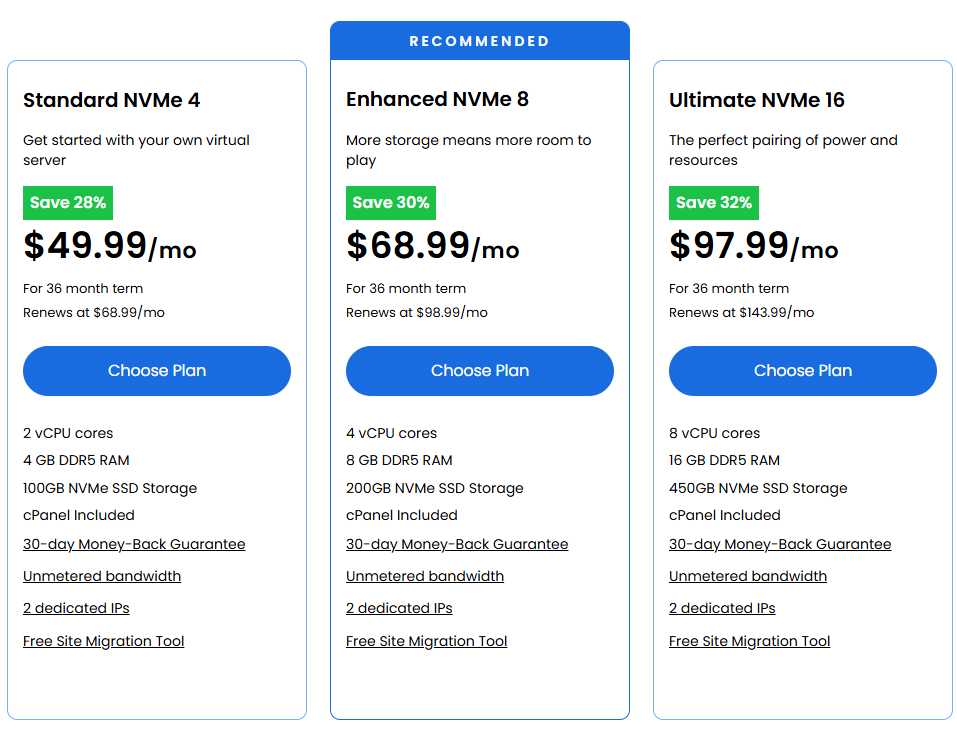
| Feature | Standard NVMe 4 | Enhanced NVMe 8 | Ultimate NVMe 16 |
|---|---|---|---|
| Price (36-mo) | $49.99/mo | $68.99/mo | $97.99/mo |
| Renewal Price | $88.99/mo | $98.99/mo | $143.99/mo |
| Discount | 28% off | 30% off | 32% off |
| vCPU Cores | 2 vCPU | 4 vCPU | 8 vCPU |
| RAM | 4 GB DDR5 | 8 GB DDR5 | 16 GB DDR5 |
| Storage | 100 GB NVMe SSD | 200 GB NVMe SSD | 450 GB NVMe SSD |
| Dedicated IPs | 2 | 2 | 2 |
| cPanel | Included | Included | Included |
| Bandwidth | Unmetered | Unmetered | Unmetered |
| Migration Tool | Free | Free | Free |
| Money-Back | 30 days | 30 days | 30 days |
The Enhanced NVMe 8 is marked “Recommended” by Bluehost — and honestly, for a growing WordPress site or a WooCommerce store handling decent traffic, 8 GB DDR5 RAM with 4 vCPU cores is the sweet spot. The Standard plan works fine for one or two active sites, but if you’re running anything beyond that, you’ll feel the constraints.
What’s Included With Every Plan — No Hidden Surprises
This is the part most deal articles skip. So here’s what all three managed VPS plans include at no additional cost:
- 24/7 expert support — Tier-3 WordPress experts on all advanced plans
- SiteLock security — malware scanning and threat detection
- Free SSL certificates — auto-provisioned
- Automated daily backups — not just on-demand, scheduled
- CDN add-on — available with all plans
- Staging environment — useful if you’re doing active development
- SSH and SFTP access — full server-level access when needed
- HTTP/2 enabled servers — this matters for Core Web Vitals; HTTP/2 allows multiplexed requests, which means faster page loads, especially on asset-heavy WordPress themes
- Optimized caching — server-side, not just plugin-dependent
- Unlimited applications — no restrictions on what you can install
- Free migration tool — zero downtime transfer with content, themes, and plugins preserved
One thing worth mentioning from a performance standpoint: the AMD EPYC chip + NVMe SSD combination is genuinely good hardware. NVMe drives have significantly faster read/write speeds compared to standard SATA SSDs — and when you’re running a site with heavy plugin stacks (Elementor, WooCommerce, etc.), that storage speed actually shows up in your TTFB (Time to First Byte) and LCP scores.
The Managed Part — What Bluehost Actually Handles for You
“Managed” is one of those words that gets stretched to mean very different things across hosts. Here’s what Bluehost specifically handles as part of their managed VPS setup:
Their team configures the server from day one — installs required software, sets up cPanel, and ensures everything is optimized before you touch it. This is not the same as a self-managed VPS, where you SSH in and configure everything yourself.
The server is also monitored for performance and security on an ongoing basis. You get a staging environment (important for development work — I always push clients to use staging before live deployments), plus the team handles the migration process end-to-end if you’re coming from another host.
One honest note: Bluehost’s managed VPS is not fully hands-off like a dedicated managed service from a provider like Liquid Web. You still have root access and full control — but you’re expected to manage your WordPress installs, plugins, and site-level configurations yourself. The “managed” label applies to the server infrastructure layer, not the application layer.
✅ Pros and Cons of Bluehost VPS Hosting
Pros
- cPanel included at no extra cost — most competitors charge $15–$25/mo separately for cPanel licensing; Bluehost bundles it
- AMD EPYC + DDR5 + NVMe combination — genuinely modern hardware, not outdated specs dressed up in new branding
- Staging environment included — uncommon at this price point; critical for developers and client sites
- Unmetered bandwidth — no surprises on billing even during traffic spikes
- WordPress-optimized infrastructure — ReviewSignal rated Bluehost as a Top-Tier WordPress provider for both site speed and uptime
- Free site migration — zero-downtime transfer with 4.5/5 Trustpilot rating across 29,000+ reviews backing the support quality
Cons
- Renewal prices jump significantly — the Standard plan renews at $88.99/mo versus the $49.99/mo intro price; that’s nearly double; plan for this at purchase time
- 36-month lock-in required for best savings — the 28–32% discount only applies on the 3-year term; shorter terms cost more
- “Managed” is infrastructure-level, not application-level — you still manage your WordPress installs, themes, and plugins yourself
- No Windows server option — all plans are Linux-based; if your application requires Windows, look elsewhere
- Custom plan requires a sales call — there’s no self-serve option for the Custom tier; you have to contact their team directly
How It Compares — Bluehost VPS vs the Competition
Before you commit, it’s worth knowing where Bluehost lands relative to what else is out there at similar price points.
| Feature | Bluehost VPS | Hostinger VPS | InMotion VPS | Liquid Web VPS |
|---|---|---|---|---|
| Starting Price | $49.99/mo | $6.49/mo (KVM 1) | $14.99/mo | $36/mo |
| RAM (Entry Plan) | 4 GB DDR5 | 4 GB | 8 GB | 4 GB |
| Storage (Entry) | 100 GB NVMe | 50 GB NVMe | 160 GB NVMe | 80 GB SSD |
| vCPU (Entry) | 2 vCPU | 1 vCPU | 4 vCPU | 2 vCPU |
| cPanel Included | Yes (free) | Add-on (paid) | Yes (cPanel or CWP) | Yes (InterWorx/cPanel/Plesk) |
| Management Level | Managed | AI-managed (self-serve) | Fully managed | Fully managed |
| Money-Back | 30 days | 30 days | 90 days | 30 days (promo period) |
| Uptime SLA | Not published | 99.9% | 99.99% | 99.99% |
| Free Migration | Yes | No | Yes (Launch Assist) | Yes |
| Support Quality | WordPress Tier-3 | AI + human chat | 24/7/365 live human | 24/7/365 specialist |
| Best For | WordPress + managed setup | Budget / developers | Agencies + businesses | High-traffic / enterprise |
The honest breakdown:
For a WordPress-focused site owner who wants managed infrastructure, cPanel pre-configured, and solid support without dealing with server administration, Bluehost VPS is the better choice at its price tier. The cPanel inclusion alone saves you real money compared to Hostinger, where it’s an add-on.
If budget is the primary concern and you’re comfortable managing a server yourself, Hostinger’s KVM plans start at $6.49/mo with AMD EPYC processors and NVMe storage. Their AI-managed (Kodee) assistant is genuinely useful for basic server operations. But this is a self-managed environment — you’re responsible for configurations, security rules, and server maintenance. Good for developers, not ideal for someone running a business site without technical backup.
InMotion Hosting is worth considering if you need the longest money-back window — they offer 90 days, and their entry VPS plan gives you 4 vCPU and 8 GB RAM at $14.99/mo, which is a strong value. Their support is fully managed with human experts available 24/7, and they include Launch Assist (a $199 value) for onboarding. Good fit for agencies and growing businesses that want more hands-on managed support.
Liquid Web is in a different tier altogether — their managed VPS starts at $36/mo (currently 50% off for 2 months) and is built for high-traffic environments. If you’re running a WooCommerce store with significant transaction volume, or a SaaS application that can’t afford downtime, Liquid Web’s fully managed service with 24/7/365 specialist support is more appropriate than any of the above. The price difference is justified at that scale.
Which Bluehost VPS Plan Should You Pick?
Most people overthink this. Here’s a clean decision framework:
Standard NVMe 4 ($49.99/mo) — 1 to 2 WordPress sites with moderate traffic. Good entry point if you’re migrating from shared hosting and want to test the waters without overspending.
Enhanced NVMe 8 ($68.99/mo) — Running 3–5 WordPress or WooCommerce sites, handling regular traffic spikes, or needing a staging environment for client work. This is the plan I’d point most bloggers and small business owners toward. The 4 vCPU + 8 GB DDR5 combination handles plugin-heavy setups without throttling.
Ultimate NVMe 16 ($97.99/mo) — Multiple active sites, high concurrent users, resource-intensive applications, or agency work managing several client properties. The 8 vCPU + 16 GB DDR5 + 450 GB NVMe is serious hardware at this price point.
One thing to watch: if you’re on the Standard plan and running an Elementor-heavy theme with WooCommerce, you might notice PHP memory limits tightening under load. That’s not a Bluehost-specific issue — it’s a resource constraint reality. Build in headroom if your site is going to grow.
What to Do After Buying Bluehost VPS Hosting
A lot of people activate the plan and then sit on a bare server, wondering what to do next. Here’s a practical starting sequence:
- Log in to your dashboard and verify cPanel access first — Bluehost’s team sets up cPanel, but confirm the login credentials are delivered and working before anything else.
- Set up your staging environment immediately — Even before migrating your live site. Get familiar with the staging workflow. Bluehost includes this — use it.
- Run your migration through the free migration tool — Don’t do a manual file transfer if you don’t have to. Their migration tool handles content, themes, plugins, and the database. Zero downtime.
- Configure your SSL — Free SSL is included. Make sure it’s activated on your domain before going live.
- Check your caching setup — Bluehost includes server-side optimized caching. Pair it with a caching plugin (WP Rocket or LiteSpeed Cache works well), but avoid running two caching systems simultaneously — that creates conflicts and actually slows things down.
- Verify your Core Web Vitals post-migration — Use Google Search Console or PageSpeed Insights. With NVMe + AMD EPYC hardware, your TTFB should be noticeably better than shared hosting. If it isn’t, there’s likely a plugin conflict or an unoptimized database query to chase down.
- Enable automated backups and confirm the schedule — Bluehost includes this, but verify the backup frequency in your dashboard settings. Don’t assume it’s running until you’ve confirmed it.
Price Disclaimer: The price of this product may change over time due to discounts, promotions, or other factors. It may increase or decrease, so we recommend checking the official website for the most accurate and updated price. The link is provided in the article.
Exclusive Bluehost VPS Hosting Discount
Deal: Up to 32% OFF
Coupon Code: No code needed – Discounted Link
Frequently Asked Questions
Does Bluehost VPS include cPanel for free?
Yes. All three managed VPS plans — Standard NVMe 4, Enhanced NVMe 8, and Ultimate NVMe 16 — include cPanel at no additional cost. This is worth noting because cPanel licensing for VPS typically costs $15–$25/month extra with providers like Hostinger. With Bluehost, it’s bundled in from day one, and WHM is available for multi-site management as well.
What is the actual discount on Bluehost VPS right now?
The current offer provides 28% off on the Standard plan, 30% off on the Enhanced plan, and 32% off on the Ultimate plan — all on a 36-month billing term. Shorter terms will be priced higher. The promotional pricing is for new customers, and renewal rates apply after the initial term ends (renewal prices are noticeably higher, so factor that in).
Is Bluehost VPS truly managed, or do I still have to manage the server?
Bluehost’s managed VPS means their team handles server setup, configuration, performance monitoring, cPanel installation, and security patching at the infrastructure level. You retain full root access and manage your WordPress sites, plugins, and application layer yourself. It’s not a fully hands-off managed service like Liquid Web — but it removes the heavy lifting of server administration for most users.
Can I upgrade my Bluehost VPS plan later without downtime?
Yes. Bluehost’s managed VPS platform supports plan upgrades with minimal disruption. You keep your existing server settings, dedicated IP addresses, and data intact during an upgrade. This is standard across VPS providers, but worth confirming — scaling up a few months in is a realistic scenario for growing sites.
Is there a free trial for Bluehost VPS hosting?
There’s no free trial, but all plans include a 30-day money-back guarantee. If the service doesn’t meet your expectations within the first 30 days, you can request a refund. This is sufficient to test the performance, cPanel setup, and support responsiveness before committing long-term.
The difference is significant in practice. On shared hosting, your server resources (CPU, RAM, I/O) are split with dozens or hundreds of other accounts. On Bluehost VPS, you get isolated vCPU cores and dedicated DDR5 RAM — no noisy neighbor effect. Sites that run on NVMe VPS infrastructure typically see materially better TTFB and LCP scores versus shared hosting, which translates to better Google Core Web Vitals performance.
Who should NOT buy Bluehost VPS hosting?
If your primary need is the absolute lowest price and you’re comfortable managing a Linux server yourself, Hostinger’s KVM plans at $6.49/mo give you more raw resources per dollar spent. If you’re running an enterprise-level WooCommerce store with high transaction volume and need fully managed application-level support, Liquid Web is the more appropriate fit. Bluehost VPS sits in the middle — managed infrastructure, strong WordPress optimization, and a trusted brand name — but it’s not the cheapest option and not the most premium one either.
Final Verdict
The current Bluehost VPS deal — up to 32% off on a 36-month term — is a reasonable offer for anyone who wants managed VPS hosting with cPanel included, solid AMD EPYC + NVMe hardware, and WordPress-specific infrastructure without the complexity of self-managing a server.
The Enhanced NVMe 8 at $68.99/mo is the plan most people should start with. It has the right balance of resources for growing WordPress and WooCommerce sites, cPanel is already set up, and the staging environment alone is worth the price difference over the entry plan.
Watch the renewal pricing — the introductory rates are promotional. Budget for the higher renewal cost before you sign up for 36 months.
👉 Grab the Bluehost VPS Deal — Save Up to 32%
Start building your brand, choose your plan
Begin your journey to success by building your brand—explore and choose the perfect plan that fits your needs today!
Standard NVMe 4
For 36 month term
- 2 vCPU cores
- 4 GB DDR5 RAM
- 100GB NVMe SSD Storage
- cPanel Included
- 30-day Money-Back Guarantee
- Unmetered bandwidth
- 2 dedicated IPs
- Free Site Migration Tool
Enhanced NVMe 8
For 36 month term
- 4 vCPU cores
- 8 GB DDR5 RAM
- 200GB NVMe SSD Storage
- cPanel Included
- 30-day Money-Back Guarantee
- Unmetered bandwidth
- 2 dedicated IPs
- Free Site Migration Tool
Ultimate NVMe 16
For 36 month term
- 8 vCPU cores
- 16 GB DDR5 RAM
- 450GB NVMe SSD Storage
- cPanel Included
- 30-day Money-Back Guarantee
- Unmetered bandwidth
- 2 dedicated IPs
- Free Site Migration Tool
