Bluehost runs some genuinely good promotional pricing — but only if you know which plan to pick and when to grab it. The Starter plan drops to $3.99/mo, and the Business plan (the one most WordPress users actually need) comes in at $6.99/mo on the 36-month term. This article breaks down every plan, compares it honestly with Hostinger, SiteGround, and DreamHost, and tells you exactly what you’re getting before you spend a rupee.
Current Bluehost Shared Hosting Offer (May 2026)
Coupon Code: No code needed – Discounted Link

This post contains affiliate links. If you purchase through our links, we may earn a small commission at no extra cost to you. Thank you for your support!

Before jumping into pricing, let’s talk about what you’re really getting — because “shared hosting” from different companies means very different things.
Bluehost’s shared plans run on NVMe SSD storage (faster read/write than regular SSD), come bundled with free malware scanning, Web Application Firewall, DDoS protection, and weekly backups. Even the base Starter plan gets you managed WordPress updates and a staging environment — which honestly surprised me when I looked at it more carefully. Most budget hosts charge extra for staging.
There’s also an AI site creation tool built in now, which is useful if you’re setting up a new site for a client and want something quick to work with before the custom theme goes in.
One thing worth noting from a performance standpoint — Bluehost’s own data (via WPShout’s November 2025 comparison) shows a US load time of 0.35 seconds, which puts it ahead of Kinsta (0.43s), WP Engine (0.53s), SiteGround (1.17s), and Hostinger (1.92s) in that test. That’s a meaningful gap if Core Web Vitals matter to your project — and they do for SEO.
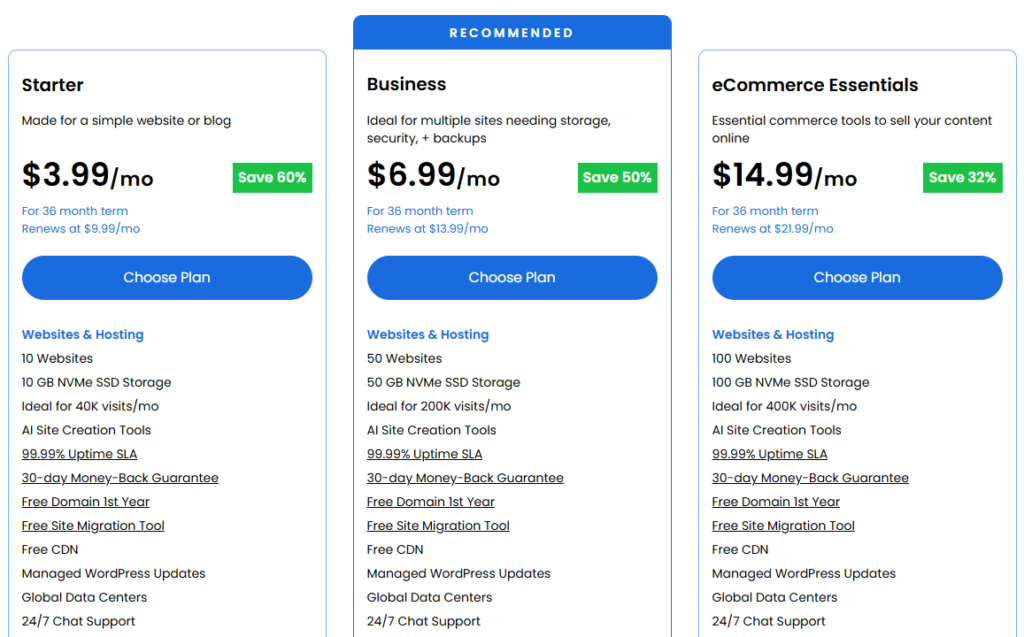
Here’s the complete plan breakdown based on the current pricing page (36-month term):
Starter — $3.99/mo (Renews at $9.99/mo)
Good for a personal blog or a test site. You get 10 websites, 10 GB NVMe SSD storage, handles up to 40K visits/mo, free domain, free SSL, weekly backups, and 24/7 chat support. Phone support is not included on this tier.
Honest take: for a new blog with low traffic, this works. But if you’re building anything for a client or running affiliate content, jump to Business.
Business — $6.99/mo (Renews at $13.99/mo) ⭐ Recommended
This is the sweet spot for most WordPress users. 50 websites, 50 GB NVMe SSD, handles 200K visits/mo, phone support included, domain privacy for the first year, malware detection and removal (not just scanning), and a WordPress staging site. The jump from Starter to Business is worth it — especially for the phone support and malware removal.
I’ve set up client sites on the Business plan before and the staging environment alone saves time during theme customizations or plugin updates.
eCommerce Essentials — $14.99/mo (Renews at $21.99/mo)
Built for WooCommerce. 100 websites, 100 GB NVMe SSD, 400K visits/mo capacity, plus dedicated commerce tools: WooCommerce auto-install, secure payment processing, product subscriptions, visitor memberships, affiliate program management, and custom email templates. If you’re running an actual online store, this is the right tier. If you’re just adding WooCommerce to a blog, Business is enough.
The Renewal Trap — Read Before You Buy
Here’s the thing most people miss. The promotional pricing applies only for the initial term. After that:
- Starter goes from $3.99/mo → $9.99/mo
- Business goes from $6.99/mo → $13.99/mo
- eCommerce Essentials goes from $14.99/mo → $21.99/mo
So if you commit to 36 months, you lock in the deal for 3 years. That’s actually solid value. But if you only buy 12 months thinking you’ll renew at the same rate — you’ll be in for a surprise. Bluehost does show renewal rates on the pricing page, so it’s not hidden. But it’s easy to overlook.
My recommendation: if you’re serious about the site, go 36 months and lock the deal.
Bluehost High Performance Plans (Standard vs High Performance Toggle)
Worth mentioning — Bluehost also shows a “High Performance” tab on their hosting page with a separate set of plans:
- Pro — $9.99/mo, 5X CPU, 100 sites, 100 GB NVMe (renews at $16.99/mo)
- Premium — $13.99/mo, 6X CPU, 150 GB NVMe (renews at $20.99/mo)
- Enhanced — $16.99/mo, 8X CPU, 200 GB NVMe (renews at $24.99/mo)
- Elite — $19.99/mo, 10X CPU, 250 GB NVMe (renews at $28.99/mo)
These are for growing businesses with traffic spikes or resource-heavy sites. If you’re on a standard shared plan and notice slowdowns during traffic surges, upgrading to Pro makes sense. But for most content sites and small WooCommerce stores, the standard Business plan does the job.
✅ Pros
- NVMe SSD across all plans — not just “SSD” — actual NVMe, which makes a real difference in TTFB and WordPress dashboard responsiveness
- Staging environment included — even on Business tier, which budget hosts often skip or paywall
- Free malware detection + removal on Business and above — not just scanning
- Managed WordPress updates — saves time on maintenance-heavy client sites
- AI Site Creation Tools — handy for quick launches or client wireframes
- 99.99% uptime SLA — one of the stronger uptime commitments in this price range
❌ Cons
- Renewal pricing jumps significantly — Starter nearly triples at renewal. If you’re not prepared for this, it stings
- Phone support excluded on Starter — this is a real limitation if you’re a non-technical user
- 10 GB storage on Starter is tight — a media-heavy WordPress site eats through this fast with images and plugins
- No daily backups on Starter — only weekly, which is a risk if something goes wrong between backup windows
Bluehost vs Hostinger vs SiteGround vs DreamHost — Honest Comparison
Here’s where things get interesting. All four are solid options, but they serve different users. Let’s look at the data directly from each provider’s current pricing:
| Feature | Bluehost (Business) | Hostinger (Business) | SiteGround (GrowBig) | DreamHost (Growth) |
|---|---|---|---|---|
| Starting Price | $6.99/mo | $3.99/mo | $6.69/mo | $3.99/mo |
| Renews At | $13.99/mo | $16.99/mo | $29.99/mo | $12.99/mo |
| Websites | 50 | 50 | Unlimited | 50 |
| Storage | 50 GB NVMe SSD | 50 GB NVMe | 50 GB Premium Google Cloud | 50 GB NVMe SSD |
| Free Domain | 1st Year | 1st Year (annual plans) | Free Migrations | 1st Year |
| Free SSL | ✅ Let’s Encrypt | ✅ Unlimited | ✅ Included | ✅ Unlimited Free |
| Daily Backups | Weekly only | ✅ Daily | ✅ Daily | ✅ Daily Automated |
| Staging | ✅ Included | ❌ Not on Business | ✅ GrowBig+ | ❌ Not mentioned |
| Phone Support | ✅ Included | ❌ Chat only | ❌ Chat/ticket only | ❌ Chat/ticket only |
| Uptime Guarantee | 99.99% SLA | 99.9% | 99.9% | 99.9% |
| CDN | ✅ Free CDN | ✅ Free (Business+) | ✅ Free built-in CDN | Extra (BunnyCDN $9.95/mo) |
| Best For | WordPress + phone support needed | Budget beginners, multiple sites | Speed-focused, Google Cloud infra | Developer-friendly, clean UI |
Winner by use case:
- For WordPress beginners who want phone support: Bluehost Business is the better choice. It’s the only one in this group that gives you actual phone support at this price range.
- For pure budget and multiple sites: Hostinger at $3.99/mo wins on intro price. But watch the renewal: it goes to $16.99/mo, which is actually higher than Bluehost’s renewal.
- For speed and Google Cloud infrastructure: SiteGround GrowBig is worth the slightly higher renewal. Their Google Cloud backend and built-in CDN work well for content-heavy sites. However, renewing at $29.99/mo is painful.
- For developers who prefer a clean custom panel: DreamHost Growth at $3.99/mo (first year) is solid. Daily automated backups on all plans are a genuine advantage. Renewal is reasonable at $12.99/mo.
Honestly — if long-term renewal cost matters to you (and it should), DreamHost and Bluehost both renew reasonably. SiteGround’s renewal is the one to be most careful about.
Who Should Pick Bluehost — and Who Should Skip It
Bluehost makes sense if:
- You’re building a WordPress blog, niche site, or affiliate site and want a known, stable host
- You or your client may need phone support — Bluehost is rare in offering this at shared hosting prices
- You want NVMe storage + staging + malware removal without paying VPS-level prices
- You’re okay with committing to a 36-month term to lock in the deal
Skip Bluehost if:
- You only need hosting for 1–2 sites and want the absolute cheapest renewal — DreamHost wins that game
- You prioritize Google Cloud infrastructure and are fine paying more at renewal — SiteGround is better there
- You need Node.js support or more technical server control — Hostinger’s Cloud Startup plan offers dedicated IP, 4 GB RAM, and Node.js apps, which Bluehost shared hosting doesn’t match
A few things I’d set up immediately after activating the plan:
1. Install WordPress via the one-click installer — don’t overthink it. It takes about 90 seconds.
2. Enable the free CDN from your Bluehost dashboard — it’s there but not always activated by default. Turning it on reduces load time for visitors who aren’t near the data center.
3. Check your caching settings — Bluehost includes object caching and static content caching. In a client project I worked on, just enabling these two dropped the Time to First Byte noticeably without any plugin changes.
4. Set up domain privacy — it’s free for the first year on Business. Don’t skip it; WHOIS data without privacy protection means your personal details become publicly searchable.
5. Test your staging site before going live — the WordPress Staging Site feature is built in. Use it. Push any new theme or major plugin update to staging first, then deploy to live. Saves a lot of headaches.
6. Don’t install too many plugins upfront — shared hosting has shared CPU. Every extra plugin that loads JavaScript or makes database calls adds weight. Start lean, add only what you need.
Price Disclaimer: The price of this product may change over time due to discounts, promotions, or other factors. It may increase or decrease, so we recommend checking the official website for the most accurate and updated price. The link is provided in the article.
Exclusive Bluehost Shared Hosting Discount
Deal: Up to 60% OFF
Coupon Code: No code needed – Discounted Link
Frequently Asked Questions
Is the 60% discount permanent or only for the first term?
The promotional pricing applies only to the initial billing cycle. Once your term ends, the plan renews at the standard rate. For starters, that means going from $3.99/mo to $9.99/mo. Always check the renewal rate shown on the pricing page before committing. Choosing a longer term (36 months) locks in the discounted rate for longer, which is the smarter move financially.
The Business plan at $6.99/mo is genuinely the better starting point for most people, not Starter. The reason is simple: you get phone support, malware removal (not just scanning), domain privacy, and daily staging. These aren’t luxury features; they’re things you’ll want the first time something breaks. The $3 difference per month over 3 years is about ₹7,000 — worth it for the peace of mind.
Not technically hidden — but easy to miss. Domain renewal after the first year is charged at the standard rate (typically around $15–20/year). The promotional price is only for the hosting term you choose. Optional add-ons like professional email or advanced security tools are shown during checkout and not pre-selected. Overall, Bluehost is fairly transparent about this.
Yes, but it depends on scale. For a store with under a few hundred products and moderate traffic, the Business plan handles it fine. If you’re expecting serious traffic or running a marketplace with a large catalog, the eCommerce Essentials plan ($14.99/mo) is the right choice — it includes WooCommerce auto-install, payment processing tools, subscriptions, and memberships out of the box.
From what I’ve observed, setting up WordPress sites on Bluehost — the combination of NVMe storage, object caching, and the free CDN makes a solid foundation. Bluehost’s own benchmark data shows a 0.35s US load time. That said, Core Web Vitals performance also depends heavily on your theme, plugins, and image optimization — the host provides the base, but you need to optimize the site itself.
What happens if I exceed my storage or traffic limits?
Bluehost’s shared plans don’t enforce strict bandwidth caps (they advertise unmetered bandwidth), but CPU usage is shared. If your site consistently spikes traffic beyond what the plan is designed for (e.g., 40K visits/mo on Starter), Bluehost may prompt you to upgrade. It’s not an instant shutoff — more of a nudge. Monitor your traffic and upgrade before it becomes an issue.
Final Verdict
Bluehost shared hosting at up to 60% off is one of the more reliable deals in the WordPress hosting space right now. The Business plan at $6.99/mo hits a real sweet spot — NVMe storage, staging, phone support, and malware removal at a price that’s hard to beat if you’re locking in the 36-month term.
It’s not perfect. The renewal jump on Starter is significant, and daily backups being absent on the base plan is a genuine gap. But for most WordPress users — whether it’s a personal blog, a niche affiliate site, or a client project — Bluehost Business covers the essentials without overcomplicating things.
👉 Get Bluehost Shared Hosting – Up to 60% Off
Check the official pricing page before purchasing to confirm current rates — offers and terms can update.
Start building your brand, choose your plan
Begin your journey to success by building your brand—explore and choose the perfect plan that fits your needs today!
Basic
Websites & Hosting
- 10 Websites
- 10 GB NVMe SSD Storage
- Ideal for 40K visits/mo
- AI Site Creation Tools
- 99.99% Uptime SLA
- 30-day Money-Back Guarantee
- Free Domain 1st Year
- Free Site Migration Tool
- Free CDN
- Managed WordPress Updates
- Global Data Centers
- 24/7 Chat Support
- Phone Support Not Included
Choice Plus
Websites & Hosting
- 50 Websites
- 50 GB NVMe SSD Storage
- Ideal for 200K visits/mo
- AI Site Creation Tools
- 99.99% Uptime SLA
- 30-day Money-Back Guarantee
- Free Domain 1st Year
- Free Site Migration Tool
- Free CDN
- Managed WordPress Updates
- Global Data Centers
- 24/7 Chat Support
- Phone Support Included
Online Store
Websites & Hosting
- 100 Websites
- 100 GB NVMe SSD Storage
- Ideal for 400K visits/mo
- AI Site Creation Tools
- 99.99% Uptime SLA
- 30-day Money-Back Guarantee
- Free Domain 1st Year
- Free Site Migration Tool
- Free CDN
- Managed WordPress Updates
- Global Data Centers
- 24/7 Chat Support
- Phone Support Included
