Bluehost’s dedicated hosting plans are currently running a solid promotional offer — up to 25% off on their entry-level Standard NVMe plan. If you’ve been eyeing a dedicated server for a high-traffic WordPress site, a WooCommerce store, or a client project that outgrew shared or VPS hosting, this is a decent window to lock in.
The plans run on latest-gen AMD EPYC chips with DDR5 RAM and ultrafast NVMe SSD storage. Not just branding — there’s real hardware backing these prices.
Exclusive Bluehost Dedicated Hosting Deal:
Get Bluehost’s Standard NVMe 32 plan for just $144.19/mo instead of $191.79/mo – that’s a flat 25% discount! Enjoy blazing-fast NVMe storage, free SSL, 24/7 expert support, and top-tier security.
Don’t miss out – this limited-time deal won’t last long!
Coupon Code: No code needed – Discounted Link

This post contains affiliate links. If you purchase through our links, we may earn a small commission at no extra cost to you. Thank you for your support!

What You Actually Get With These Plans
Let me break down what’s inside each plan — not the marketing version, the actual specs.
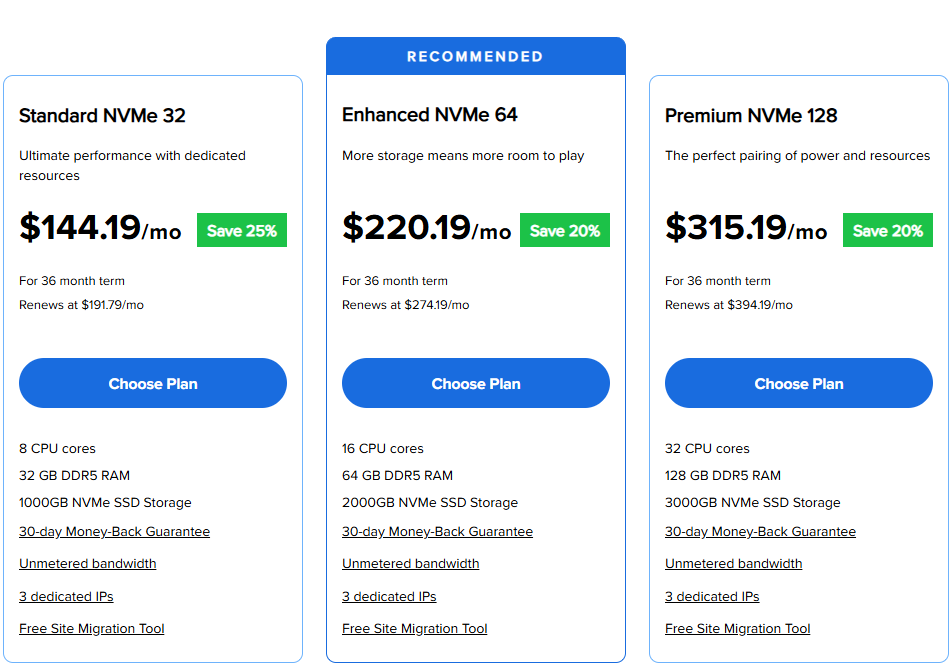
| Feature | Standard NVMe 32 | Enhanced NVMe 64 | Premium NVMe 128 |
|---|---|---|---|
| CPU Cores | 8 CPU Cores | 16 CPU Cores | 32 CPU Cores |
| RAM | 32 GB DDR5 | 64 GB DDR5 | 128 GB DDR5 |
| Storage | 1000 GB NVMe SSD | 2000 GB NVMe SSD | 3000 GB NVMe SSD |
| Dedicated IPs | 3 | 3 | 3 |
| Bandwidth | Unmetered | Unmetered | Unmetered |
| Promotional Price | $144.19/mo | $220.19/mo | $315.19/mo |
| Renewal Price | $191.75/mo | $274.19/mo | $394.19/mo |
| Money-Back | 30 days | 30 days | 30 days |
The DDR5 RAM is worth calling out. Most competitors at this price range are still running DDR4. From a performance standpoint, DDR5 offers significantly higher memory bandwidth, which matters when you’re running multiple applications, database-heavy WordPress sites, or high-concurrency WooCommerce stores.
The NVMe storage also isn’t just a marketing tag here. NVMe SSDs use a PCIe interface instead of the older SATA path, which means dramatically lower read/write latency. For WordPress sites, this translates directly to faster PHP execution and database queries.
What’s Included With Every Plan (Not Optional Add-Ons)
This is where Bluehost actually does well — the inclusions across all three dedicated plans are substantial:
- 24/7 support — Tier-3 WordPress expert support with under 30-second chat response times
- SiteLock security — Premium WAF, malware scanning, DDoS protection (>3Tbps), and 2FA
- Free SSL certificates — Multiple certificates included per account
- Automated backups — Regular off-site backups, not just a checkbox feature
- Optimized caching + CDN add-on — Cloudflare Enterprise CDN is available
- Free site migration tool — Helpful for moving from existing hosts
- Staging environment — Critical for agencies doing client work
- SSH and SFTP access — Full developer access built in
- HTTP/2 enabled servers — Better multiplexing for page load performance
- WHM + cPanel — Standard plan includes 5 cPanel accounts; Premium includes 50
The staging environment and WHM access together make this genuinely useful for WordPress developers and agencies managing client sites. I’ve set up similar configurations for client projects — having a staging environment baked in saves a lot of manual setup time.
The Hardware Behind It — Worth Paying Attention To
Bluehost runs its dedicated servers on Dell rack-mount servers powered by AMD EPYC chips. EPYC processors are server-grade chips designed for multi-core workloads — they’re not the same chips that go into consumer or gaming machines. Superior processing power, high core counts, and built for sustained load.
Combined with DDR5 RAM and NVMe SSD storage, you’re getting a legitimately modern hardware stack. The server infrastructure uses LiteSpeed (for speed), NVMe storage layer, and Cloudflare Enterprise CDN integration for edge-level performance.
From a Core Web Vitals perspective, faster NVMe storage directly impacts TTFB (Time to First Byte), which affects LCP scores. If you’re running a site where SEO performance matters, the underlying server hardware isn’t something to overlook.
One note from working on performance-heavy WordPress projects: the combination of NVMe storage + DDR5 RAM noticeably reduces server response time compared to standard SATA SSD + DDR4 setups. Not a dramatic overnight jump — but measurable, especially under load.
Which Plan Makes Sense for You?
Here’s the practical breakdown — not the sales version.
Standard NVMe 32 ($144.19/mo) Best for: Single high-traffic WordPress site, mid-size WooCommerce store, small agencies hosting 3–5 client sites. 8 cores and 32 GB DDR5 RAM handle most workloads comfortably at this level.
Enhanced NVMe 64 ($220.19/mo) Best for: Agencies managing multiple WordPress installs, developers running staging + live environments simultaneously, media-heavy sites with large databases. The jump to 16 cores and 64 GB RAM gives meaningful headroom. This is the “recommended” plan for a reason — it’s the sweet spot for most serious use cases.
Premium NVMe 128 ($315.19/mo) Best for: Enterprise WordPress environments, large WooCommerce catalogs with heavy concurrent traffic, agencies managing 20+ client sites under one WHM account. 32 cores and 128 GB DDR5 is server muscle that most businesses genuinely won’t max out — but if you need it, you’ll know.
Who should skip dedicated entirely: If you’re running a single WordPress blog or small business site under 50,000 monthly visits, a Managed VPS or Cloud Hosting plan would serve you better at a fraction of the cost. Dedicated hosting makes sense when you need isolated resources, root-level control, or you’re hosting multiple sites/clients on one server.
Pros and Cons — Honest Take
✅ Pros
- DDR5 RAM across all plans — Genuinely better than most competitors at this price point
- NVMe SSD storage — Faster read/write than SATA SSDs used by many budget dedicated hosts
- Staging environment included — Major time-saver for WordPress developers doing client work
- WHM + cPanel bundled — Manage multiple client accounts without extra licensing costs
- Tier-3 WordPress expert support — Under 30-second chat response time is actually impressive
- Cloudflare Enterprise CDN available — Enterprise-level edge network, not just a basic CDN toggle
❌ Cons
- Renewal prices jump significantly — Standard plan goes from $144.19/mo to $191.75/mo after 36 months. That’s a 33% increase. Budget for it.
- 36-month commitment required for deals — Shorter terms get much higher prices. Not ideal for users who prefer flexibility.
- Only 3 dedicated IPs on all plans — InMotion’s comparable plans offer 5 to 16 IPs depending on tier, which matters for agencies managing multiple SSL certificates per client.
- No bare-metal or unmanaged option — Bluehost only offers managed dedicated hosting. Not the right fit if you want full OS-level control without a management layer.
How Bluehost Compares to InMotion Hosting and Liquid Web
These two come up constantly in the same searches. Here’s an honest side-by-side using actual pricing from their current pages.
| Feature | Bluehost Dedicated | InMotion Dedicated | Liquid Web Dedicated |
|---|---|---|---|
| Entry Price (Promo) | $144.19/mo | $189.98/mo (Premier Care) | $77.50/mo (50% off, 2 mo) |
| Entry RAM | 32 GB DDR5 | 64 GB DDR4 | 12 GB |
| Entry Storage | 1000 GB NVMe | 2 TB SSD | 383 GB SSD RAID-1 |
| Dedicated IPs (Entry) | 3 | 5 | 1 |
| Bandwidth | Unmetered | 1 Gbps Unmetered | 10 TB |
| Managed? | Yes (fully managed) | Yes (managed + Premier Care) | Yes (fully managed) |
| Backup Storage | Automated backups | 500 GB (Premier Care) | Off-server backup available |
| Support Type | Tier-3 WordPress experts | APS (Advanced Product Support) | 24/7 Sonar Monitoring + human |
| Data Centers | US (Bluehost network) | LA, DC, Amsterdam | Multiple US + global |
| Control Panel | cPanel / WHM | cPanel / WHM | cPanel / Plesk / InterWorx |
| Money-Back | 30 days | 30 days | 30 days |
| Official Link | Bluehost → | InMotion → | Liquid Web → |
Winner by use case:
- For WordPress-first hosting with strong managed support: Bluehost wins. The DDR5 RAM, NVMe storage, and Tier-3 WordPress expert support make it the most WordPress-optimized option among the three.
- For agencies needing more dedicated IPs and Premier Care white-glove onboarding: InMotion makes more sense. Their $199 one-time Launch Assist and Monarx security bundled with 500 GB backup storage is a genuinely strong package. The Elite plan ($289.98/mo) offers 16 dedicated IPs — useful when you’re handling multiple SSL certificates for different clients.
- For raw price entry point (if you’re technically capable): Liquid Web’s entry plan at $77.50/mo (promotional, first 2 months) is the cheapest door in. But 12 GB RAM and 383 GB storage are underwhelming for serious workloads. Their Intel Xeon 6226R at $237.50/mo is where Liquid Web becomes genuinely competitive.
One genuine weakness to acknowledge: Bluehost’s dedicated IP allocation (3 per plan across all tiers) is the lowest of the three. For a solo WordPress site, this doesn’t matter. For an agency managing multiple clients, each needing their own dedicated IP for SSL and security reasons, InMotion or Liquid Web has a clear edge here.
What to Do After Buying
A few things worth doing right after signing up that most people skip:
1. Run the guided server setup.
Bluehost includes a guided setup to install cPanel and WordPress on your new server. Use it — it saves 30–45 minutes of manual configuration and reduces the chance of misconfigured permissions or missing PHP extensions.
2. Configure WHM before adding sites.
If you’re planning to host multiple sites or clients, set up your WHM account structure first. Adding domains later without proper WHM configuration creates messy account hierarchies that are painful to untangle.
3. Enable the staging environment early.
Don’t wait until you need it in an emergency. Set up a staging domain and test your deployment workflow before your site goes live. Bluehost’s staging environment is included — use it from day one.
4. Set up SiteLock and DDoS protection
These are included, but they’re not always enabled by default. Log in to SiteLock, verify your domain is being scanned, and confirm the WAF rules are active.
5. Check PHP version and server-level caching settings
Bluehost’s dedicated servers support PHP 8.x. Make sure your WordPress install is running the latest compatible PHP version — older versions have known performance and security issues.
6. Monitor TTFB after setup
Use a tool like GTmetrix or Pingdom after your site is live. A well-configured Bluehost dedicated server should return a TTFB under 200ms for most WordPress setups. If it’s higher, check your caching configuration and database optimization settings.
Price Disclaimer: The price of this product may change over time due to discounts, promotions, or other factors. It may increase or decrease, so we recommend checking the official website for the most accurate and updated price. The link is provided in the article.
Exclusive Bluehost Dedicated Hosting Discount
Deal: Get 25% OFF
Coupon Code: No code needed – Discounted Link
Common Questions About Bluehost Dedicated Hosting Deals
Is the Bluehost dedicated hosting deal only available on 36-month plans?
Yes, the promotional pricing — including the 25% off on Standard NVMe 32 and 20% off on Enhanced/Premium — requires a 36-month term commitment. Shorter billing cycles are available, but at significantly higher rates. If you’re committed to dedicated hosting long-term, the 36-month option is the best value. Just account for the renewal pricing jump when planning your budget.
Does Bluehost’s dedicated hosting support WordPress multisite and WooCommerce?
Yes — Bluehost dedicated plans are well-suited for WordPress Multisite and WooCommerce. The WHM + cPanel setup supports multiple WordPress installs, and the NVMe storage + DDR5 RAM combination handles WooCommerce’s database-heavy operations without performance bottlenecks. For large WooCommerce catalogs with thousands of SKUs, the Enhanced or Premium plan is the better starting point.
Can I get root-level access with Bluehost’s dedicated hosting?
Bluehost offers SSH and SFTP access across all dedicated plans. However, they’re a fully managed host — they handle OS-level updates and patching on their end. If you need complete unmanaged root control to install custom kernels or manage your own OS stack, Liquid Web or a bare-metal provider would be a better fit.
What happens to my data if I cancel within 30 days?
Bluehost’s 30-day money-back guarantee covers the hosting cost but not domain registration fees if you purchased a domain. Back up your data before initiating a cancellation. Bluehost will process the refund, but it can take 5–10 business days to reflect, depending on your payment method.
Is Bluehost’s dedicated hosting good for agencies managing multiple client sites?
It’s workable, particularly with the WHM access and up to 50 cPanel accounts on the Premium plan. The main limitation is the dedicated IP allocation — only 3 per plan. If each client needs a dedicated IP for their SSL certificate setup, you’ll hit that ceiling quickly. InMotion’s Elite plan at $289.98/mo with 16 dedicated IPs may be a better fit for larger agencies.
Does the deal include free site migration?
Yes. All three Bluehost dedicated plans include a Free Site Migration Tool. For more complex migrations involving custom server configurations or non-CPanel environments, plan for additional manual work — the tool works best for standard WordPress or cPanel-based migrations.
What’s the difference between Bluehost’s dedicated and managed VPS hosting?
Dedicated hosting gives you a physical server entirely to yourself — no shared hardware, no noisy neighbors. VPS hosting virtualizes resources on shared hardware. Dedicated is more expensive but offers better raw performance, higher resource ceilings, and consistent performance under traffic spikes. If you’re regularly exceeding VPS resource limits or running mission-critical applications, dedicated is the right move.
Final Verdict
Bluehost’s dedicated hosting deal in 2026 is genuinely worth considering if you’re in the market for a managed dedicated server with strong WordPress integration. The DDR5 RAM, NVMe storage, and Tier-3 WordPress expert support put it ahead of many similarly priced managed dedicated options.
The main things to keep in mind: plan for the renewal price increase after 36 months, and if your agency workflow demands more than 3 dedicated IPs, have a conversation with InMotion or Liquid Web before committing.
For WordPress-first agencies, high-traffic WooCommerce stores, and developers who want solid managed infrastructure without configuring everything from scratch, Bluehost’s dedicated hosting at its current promotional price is a strong starting point.
👉 Claim Your Bluehost Dedicated Hosting Deal →
(Pricing accurate as of May 2026. Always verify current pricing on the official Bluehost website before purchasing.)
Your Ultimate Dedicated Hosting Solution
Experience blazing-fast NVMe storage, enterprise-grade security, and full server control with Bluehost’s Standard NVMe 32—Upgrade Now!
Standard NVMe 32
For 36 month term
Renews at $191.79/mo
- 8 CPU cores
- 32 GB DDR5 RAM
- 1000GB NVMe SSD Storage
- 30-day Money-Back Guarantee
- Unmetered bandwidth
- 3 dedicated IPs
- Free Site Migration Tool
Enhanced NVMe 64
For 36 month term
Renews at $274.19/mo
- 16 CPU cores
- 64 GB DDR5 RAM
- 2000GB NVMe SSD Storage
- 30-day Money-Back Guarantee
- Unmetered bandwidth
- 3 dedicated IPs
- Free Site Migration Tool
Premium NVMe 128
For 36 month term
Renews at $394.19/mo
- 32 CPU cores
- 128 GB DDR5 RAM
- 3000GB NVMe SSD Storage
- 30-day Money-Back Guarantee
- Unmetered bandwidth
- 3 dedicated IPs
- Free Site Migration Tool
