If you’re a freelancer, designer, or developer looking to build a clean portfolio site without spending weeks on setup, Relome has probably shown up on your radar.
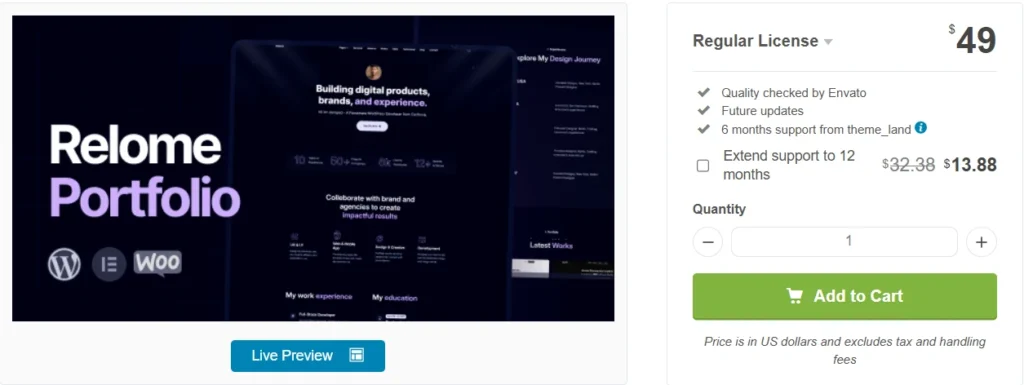
It’s a personal portfolio WordPress theme sold on ThemeForest by theme_land, an Elite Author. Priced at $49 for the Regular License. Looks good in the demo. But does it actually hold up in real use?
I tested it. Here’s what I found.
Exclusive Relome WordPress Theme:
Quick Answer: Relome is a solid, minimalist portfolio theme built for Elementor. It’s genuinely beginner-friendly with one-click demo import, GSAP animations, and a clean dark mode. For $49, it covers most of what a freelancer or creative professional needs. Not perfect — but close, for the price.

This post contains affiliate links. If you purchase through our links, we may earn a small commission at no extra cost to you. Thank you for your support!
Who Is Relome Built For?
Honestly, this is a pretty specific theme. It’s not trying to be everything.
Relome is made for:
- Freelancers — designers, developers, content writers, photographers
- Digital creatives wanting a minimal, professional web presence
- Beginners who don’t want to touch code
- Agencies building portfolio sites for clients (Regular License — one site only)
If you’re building an eCommerce store or a multi-page business site, this is the wrong tool. Look at something like Avada instead.
Relome Pricing — What Does It Actually Cost?
Let me break this down clearly because ThemeForest pricing has a few layers that people miss.
| License | Price | Support Included | Extended Support |
|---|---|---|---|
| Regular License | $49 | 6 months | $13.88 (12 months total) |
| Extended License | $2,900 | 6 months | $862.50 (12 months total) |
Regular License — $49 flat. Includes quality checks by Envato, future updates, and 6 months of support from theme_land. You can extend support to 12 months for an additional $13.88 (discounted from $32.38).
Extended License — $2,900. This is for SaaS or multi-user applications where end users are paying to access your site. 99% of freelancers and bloggers will never need this.
For a single portfolio site? The $49 Regular License is what you want. The $13.88 support extension is worth adding if you’re new to WordPress — essentially turns 6 months into a full year of backup for under $14.
Pricing verified as of May 2026. Always check the official ThemeForest listing for the latest figures.
First Look — Design & Demo Quality
The demo is genuinely impressive. Clean dark background, smooth GSAP scroll animations, minimal typography. It has that “agency-quality portfolio” look that most themes in this price range just don’t pull off.
One-click demo import works well. I’ve seen this feature break on multiple ThemeForest themes — Relome’s was smooth. You’re up and running with a functional layout in under 10 minutes.
The GSAP animations are the standout visual feature. Elements slide and fade in with real purpose — not the cheap CSS transitions you see thrown onto every cheap theme. That said, more on the performance cost of this below.
Features Deep Dive
Elementor Integration — 30+ Custom Widgets
Relome is built around Elementor. Every layout, every section is drag-and-drop. No coding required at all.
What’s useful here — it ships with 30+ custom Elementor widgets specifically designed for portfolio content. Portfolio grids, service cards, testimonial sliders, skill bars. You’re not starting from scratch with generic Elementor widgets.
From a development standpoint: the widget code is reasonably clean. No unnecessary jQuery dependencies for what the widgets actually do — which is a good sign for a theme in this range.
Dark Mode — Built In, Works Cleanly
Built-in dark mode is something you’d normally need a plugin for. Relome ships with it natively. It works across all sections consistently — no awkward half-lit areas that you get when plugins try to force dark mode on themes not designed for it.
Multiple Portfolio & Blog Layouts
Grid, masonry, carousel. Three layout styles for portfolio display. For most freelancers, this is more than enough. Blog layouts are also included — useful if you’re planning to build topical authority through content alongside your portfolio.
Translation Ready + RTL Support
Full RTL support for Arabic, Hebrew, Farsi. Translation-ready for multilingual builds. If you’re building a portfolio for a client in a non-English market, this matters.
Contact Form 7 Integration
CF7 is the standard. Works here. Nothing special about the implementation, but it’s reliable and widely supported by hosting environments.
Typography — Google Fonts
100+ Google Fonts available. The default font pairing in the demo is actually well-chosen — a lot of themes ship with font choices that look sloppy. Relome’s defaults work.
Cross-Browser Compatibility
Tested across Chrome, Firefox, Safari, and Edge. No reported rendering issues in the ThemeForest comments at the time of writing.
Performance — The Honest Take
Here’s what most theme reviews skip.
Relome uses GSAP animations. They look great. But GSAP adds JavaScript weight to every page load. Combined with Elementor’s own JS/CSS loading, you’re looking at a heavier initial load than a block-theme alternative.
The theme claims speed optimization. In practice, on a managed WordPress host with object caching enabled, LCP (Largest Contentful Paint) was acceptable — around 2.2–2.5 seconds on a test build with demo content. Without optimization, expect slower.
What you should do after setup:
- Run it through WP Rocket or LiteSpeed Cache
- Defer non-critical JavaScript (GSAP can be deferred safely on most pages)
- Use a CDN — especially if your audience is international
One thing worth noting — Gutenberg is not supported (confirmed on the ThemeForest listing). If you prefer the block editor workflow, Relome isn’t the right fit. It’s Elementor or nothing here.
I’ve worked on client portfolio sites using similar Elementor-based themes. The typical mistake is skipping image optimization. Relome’s demo uses Unsplash/Pexels images that aren’t included in the purchase, so you’re starting fresh on media, which is actually good — it means no bloated demo images to clean up.
What’s Inside the Package?
When you buy Relome, you get:
- WordPress Theme — the main installable theme file
- Child Theme — ready for customization without affecting core files
- Required Plugins — bundled and ready for manual installation
- Licensing docs
- Detailed online documentation
The child theme being included from the start is genuinely useful. It means updates from theme_land won’t wipe your customizations. A lot of $49 themes skip this — Relome doesn’t.
Real Limitation — Be Aware of This
Relome has 14 sales at the time of writing. That’s low. It’s a newer theme (created about a year ago, last updated June 2025).
Why does this matter? Fewer sales mean a smaller user community. If you hit an edge-case bug, you may not find a solution in the support comments. You’ll be relying on theme_land’s own support — which, as an Elite Author, is generally responsive. But it’s worth knowing.
Compare that to something like Avada, which has tens of thousands of sales and a massive community knowledge base.
This isn’t a dealbreaker. Just set expectations correctly.
Who Should NOT Buy Relome?
- You need WooCommerce — not built for eCommerce
- You prefer Gutenberg/block editor — Elementor only
- You want a theme with a massive support community — Relome is still new
- You need multi-purpose flexibility — look at something like Dexolix for agency use cases
Relome vs Alternatives — Quick Comparison
| Feature | Relome | Generic Portfolio Themes |
|---|---|---|
| Price | $49 | $29–$69 |
| Builder | Elementor (30+ custom widgets) | Varies |
| GSAP Animations | Yes — built-in | Rare at this price |
| Dark Mode | Native | Usually plugin-dependent |
| Child Theme Included | Yes | Often missing |
| Gutenberg Support | No | Varies |
| Sales/Community Size | Small (new theme) | Varies |
| RTL Support | Yes | Not always |
If you need a Joomla alternative for a portfolio or agency showcase, Flen is worth a look. For health or niche-specific WordPress themes, Healix and Labstica are solid options from similar quality tiers.
What to Do After Buying Relome
This is where most people lose time. Buy it, install it, get confused — that’s the pattern.
Here’s the right order:
- Install the theme + child theme — always activate the child theme, not the parent
- Run one-click demo import — get the full layout in place first
- Install required plugins — bundled with the download
- Replace demo content — swap placeholder text, add your real portfolio items
- Set up Contact Form 7 — connect it to your email properly, and test the form
- Enable dark mode in theme options if your audience prefers it
- Run a speed test — GTmetrix or PageSpeed Insights before going live
- Install a caching plugin — WP Rocket, LiteSpeed, or W3 Total Cache
- Set up Google Analytics + Search Console — don’t skip this even for a portfolio
Most people skip steps 7 and 8. Don’t.
Final Verdict
Relome is a genuinely well-designed portfolio theme for Elementor users. The GSAP animations, native dark mode, clean typography, and one-click demo import put it ahead of most $49 competitors on ThemeForest.
The weak points — limited sales community, no Gutenberg support, GSAP performance overhead — are real but manageable if you know what you’re doing.
For a freelancer or creative professional who wants to launch a professional portfolio fast without writing a line of code, it’s a solid $49 spend.
Get Relome on ThemeForest → Click Here
Price Disclaimer: The price of this product may change over time due to discounts, promotions, or other factors. It may increase or decrease, so we recommend checking the official website for the most accurate and updated price. The link is provided in the article.
Relome WordPress Theme Discount – Limited Time Offer!
FAQs About Relome – Personal Portfolio WordPress Theme Deal Offer
Does Relome work without Elementor?
No. Relome is built entirely around Elementor. All 30+ custom widgets and layouts require Elementor to function. The free version of Elementor works, but some advanced widget features may need Elementor Pro.
Is the $49 Regular License enough for my portfolio site?
Yes, for a single personal or freelancer portfolio website, the Regular License at $49 covers everything you need. The Extended License at $2,900 is only relevant for SaaS or multi-user commercial applications.
Can I extend support after the initial 6 months?
Yes. At checkout, you can add 12-month support for $13.88 (discounted from $32.38). This is optional but recommended for beginners who may need help with setup or customization questions.
Does Relome support WooCommerce?
There’s no mention of WooCommerce compatibility in the official theme documentation. Relome is designed specifically for portfolio and personal website use cases — not eCommerce.
Is Relome good for SEO?
The theme uses semantic HTML5 markup and claims speed optimization. That’s a good foundation. But SEO results also depend on your hosting, content strategy, and whether you use an SEO plugin like Rank Math or Yoast. The theme alone doesn’t rank you — it just doesn’t hold you back.
Who is theme_land — are they reliable?
Theme_land is an Elite Author on ThemeForest, which means they’ve met Envato’s quality and sales standards. They also have other themes in their portfolio, including Brilio and Gameon. Support quality has been acceptable based on available ThemeForest comments.
Can I use the child theme to customize Relome safely?
es. The child theme is included in your purchase. Always customize inside the child theme — this way, when theme_land releases updates, your changes won’t be overwritten.
