Honestly, most email marketing tools make you pay before you even understand what you’re getting into. GetResponse is different — and that’s what makes this worth talking about.
They give you 14 days of full premium access. No credit card. No commitment. You just sign up and start using it.
I’ve recommended this to a few clients running WooCommerce stores and one running a digital course business. In most cases, the free trial period alone was enough to help them decide.
So in this article, I’ll walk you through exactly what the trial includes, what the limitations are, which plan makes sense after the trial, and whether GetResponse is even worth your time in 2026.
Exclusive GetResponse 14-Day Free Trial Deal:
Quick Answer: GetResponse’s 14-day free trial gives you full access to premium features — email marketing, automation, landing pages, and more — for 1,000 subscribers, with no credit card required. After 14 days, you either upgrade to a paid plan or drop to the limited free version.
Coupon Code: No code needed – Free Trial Link
This post contains affiliate links. If you purchase through our links, we may earn a small commission at no extra cost to you. Thank you for your support!

What Is the GetResponse Free Trial?
Simple — you get 14 days to test everything GetResponse offers at the premium level.
No hidden charges. No auto-billing surprise. No need to enter card details just to explore.
This is a proper trial. Not a watered-down demo, not a “request access” form. You sign up, verify your account, and you’re in.
From a developer’s perspective, I appreciate this approach. Too many SaaS tools lock basic features behind a paywall and call it a “free plan.” GetResponse actually lets you experience the real product.
What Do You Get During the 14-Day Trial?
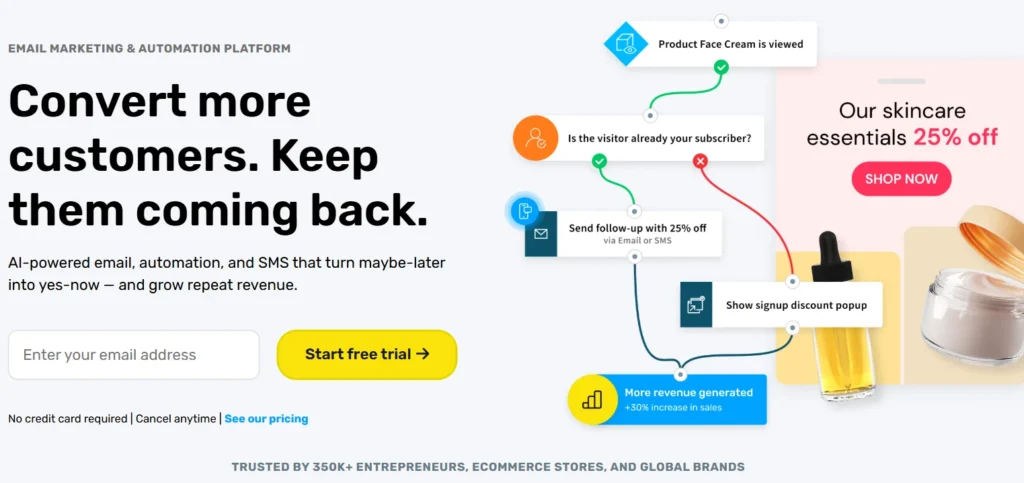
Here’s where it gets interesting. During the trial, GetResponse unlocks features from all three standard plans — Starter, Marketer, and Creator — so you can actually stress-test the platform before committing.
Here’s a breakdown of what’s available:
Email Marketing
- Unlimited monthly email sends
- AI-powered content generators
- Welcome email series
- Signup forms and popups
Automation
- Unlimited automation workflows (with some Dynamic Segment Filter restrictions)
- Abandoned cart recovery (for ecommerce users)
- Advanced audience segmentation
Landing Pages
- Create unlimited pages
- Up to 1,000 unique visitors/month during trial (unlimited visits only on paid plans)
- AB testing not available on free trial
Webinars
- Create and host webinars — but limited to 10 attendees (including you and presenters)
- Recordings and on-demand features are restricted
Courses
- Build unlimited courses for up to 250 students
- Course selling requires a paid plan
Premium Newsletters
- Create unlimited premium newsletters
- Paid subscriptions require upgrading
One important thing to know: Every email you send during the free trial will carry a GetResponse badge at the bottom. Want to remove it? You’ll need to upgrade.
What Are the Limitations?
No free trial is perfect. Here’s what GetResponse restricts during the 14 days:
| Feature | Free Trial | Paid Plans |
|---|---|---|
| Email badge on messages | Yes (can’t remove) | Removed on paid |
| Landing page visitors | 1,000/month | Unlimited |
| Webinar attendees | 10 max | Up to 100 (Creator) |
| AB testing | Not available | Available |
| Dynamic segment filter | Not available | Any paid plan |
| Course selling | Not available | Paid only |
| Paid newsletter subscriptions | Not available | Paid only |
| Support | Live chat (limited hours) | Priority on higher plans |
Honestly, for testing purposes? These limitations are fair. You still get enough access to understand if the platform fits your workflow.
GetResponse Pricing After the Trial (2026 — India)
Once your 14 days are up, you either upgrade or move to the limited free version. Let’s look at what each plan costs.
Note: Prices below are based on 1,000 subscribers, billed yearly (18% discount applied). These are INR prices displayed on the official site and may vary based on exchange rates.
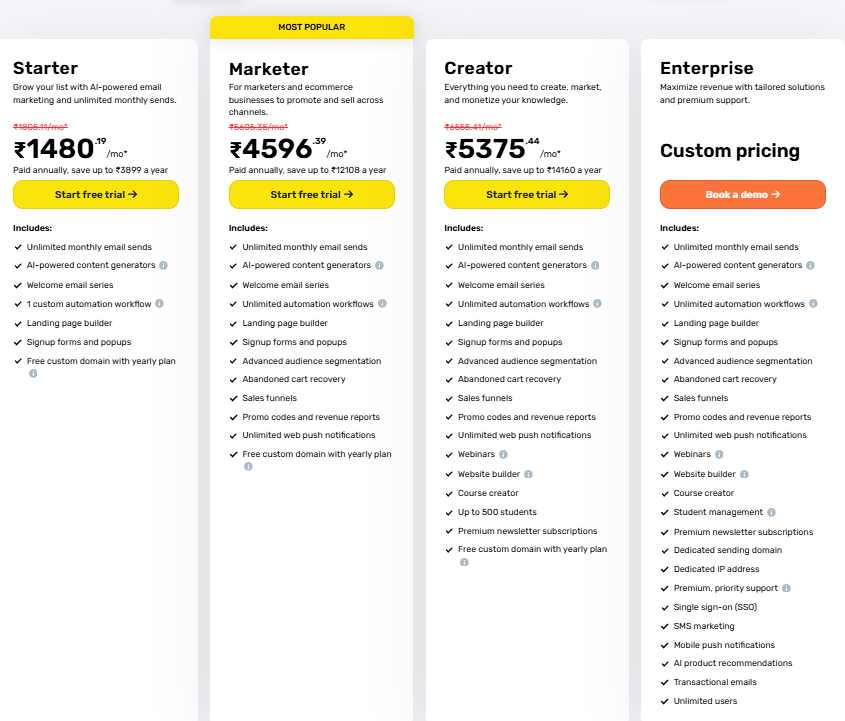
Starter — ₹1,480/month (yearly)
Regular: ₹1,805/month
Best for: Solo bloggers, small businesses, new email marketers
Includes:
- Unlimited monthly email sends
- AI-powered content generators
- Welcome email series
- 1 custom automation workflow
- Landing page builder
- Signup forms and popups
- Free custom domain (with yearly plan)
- Supports up to 3 users
Save up to ₹3,899/year on the yearly plan.
Marketer — ₹4,596/month (yearly) ⭐ Most Popular
Regular: ₹5,605/month
Best for: Ecommerce brands, marketers scaling campaigns
Includes everything in Starter, plus:
- Unlimited automation workflows
- Advanced audience segmentation
- Abandoned cart recovery
- Sales funnels
- Promo codes and revenue reports
- Unlimited web push notifications
- Up to 5 users
Save up to ₹12,108/year on the yearly plan.
Creator — ₹5,375/month (yearly)
Regular: ₹6,555/month
Best for: Course creators, educators, digital product sellers
Includes everything in Marketer, plus:
- Webinars (up to 500 students)
- Website builder
- Course creator
- Premium newsletter subscriptions
- Up to 5 users
Save up to ₹14,160/year on the yearly plan.
Enterprise — Custom Pricing
Best for: Large teams, agencies, high-volume senders
Includes everything above, plus:
- SMS marketing
- Mobile push notifications
- AI product recommendations
- Transactional emails
- Dedicated IP address
- Dedicated sending domain
- Single sign-on (SSO)
- Premium, priority support
- Unlimited users
- Customer Experience Manager
To get Enterprise pricing, you need to book a demo directly with the team.
Which Plan Should You Start With?
Most people overthink this. Here’s a simple breakdown:
Go with Starter if:
- You’re just starting your email list
- You have under 5,000 subscribers
- You don’t need advanced automation yet
- Budget is tight
Go with Marketer if:
- You run an ecommerce store (WooCommerce, Shopify)
- Abandoned cart recovery matters to you
- You’re scaling email campaigns with segmentation
- You want unlimited automation workflows
Go with Creator if:
- You sell online courses
- You run paid newsletters
- You want to host webinars for your audience
- You’re building a creator economy business
Go with Enterprise if:
- You have a large contact list (50,000+)
- You need transactional emails + SMS in one place
- You need SSO and dedicated IP for deliverability
The Yearly Billing Math — Is 18% Worth It?
Short answer: yes, almost always.
GetResponse gives you 18% off when you pay yearly instead of monthly. Let me put that in real numbers for the Marketer plan at 1,000 subscribers:
- Monthly billing: ₹5,605/month → ₹67,260/year
- Yearly billing: ₹4,596/month → ₹55,152/year
- You save: ₹12,108
That’s not a small amount. If you’re serious about email marketing, paying yearly makes sense.
One thing to watch: if you upgrade, the billing cycle restarts immediately. If you want to downgrade or switch from annual to monthly, you’ll need to contact their support team — you can’t do it from the dashboard yourself.
Hidden Cost to Watch Out For
Here’s something most pricing articles skip.
GetResponse pricing scales with list size. You start at 1,000 contacts, but as your list grows — to 2,500, 5,000, 10,000, 25,000, 50,000 — your monthly cost increases too.
So if you’re planning aggressive list growth, factor this in. The ₹1,480 Starter plan is for 1,000 subscribers. At 10,000 subscribers, that number goes up significantly.
Also: prices are charged in USD or EUR. The INR amounts you see on the site are conversions and will fluctuate with exchange rates. Always verify on the official pricing page before purchasing.
How to Start the GetResponse Free Trial (Step-by-Step)
No complicated setup. Here’s exactly how it works:
Step 1: Head to GetResponse using this link → Start Your Free Trial
Step 2: Click “Sign up free” — you won’t be asked for a card
Step 3: Enter your name, email, and create a password
Step 4: Verify your email address
Step 5: You’re in. Full 14-day premium access starts immediately
Step 6: Explore the dashboard — set up your first email list, create a form, build an automation workflow
Step 7: Before day 14, decide which plan fits your needs
That’s it. The whole process takes under 5 minutes.
What Happens After 14 Days?
Two options:
Option A — Upgrade to a paid plan: You keep all your data, contacts, automations, and settings. Everything carries over.
Option B — Stay on the free version: You lose access to premium features. The GetResponse free account still exists but it’s significantly limited — no advanced automations, restricted landing pages, limited contacts, and the GetResponse badge stays.
My honest recommendation: use the 14 days properly. Don’t just sign up and forget about it. Set up a real campaign, test the automation builder, build one landing page, send a few emails. That way you’ll actually know if it fits your workflow before paying.
Who Should NOT Use GetResponse?
Not every tool fits every situation. Skip GetResponse if:
- You only need basic email blasts with zero automation → Mailchimp free plan works
- You’re a solo creator sending fewer than 500 emails a month → cheaper options exist
- You need a dedicated transactional email tool (like for order confirmations only) → look at Postmark or SendGrid
- You’re on an extremely tight budget and can’t commit to any paid plan after the trial
GetResponse for Charities and NGOs
One thing worth mentioning — GetResponse offers 50% off every monthly plan for registered charities and NGOs. If you’re running a non-profit or helping one, this is worth checking out directly on their pricing page.
What to Do After You Start the Trial
Most people sign up and get overwhelmed by the dashboard. Here’s a smarter approach:
Day 1–2: Set up your email list. Import existing contacts if you have any. Configure your sender settings (domain, reply-to email).
Day 3–4: Build your first automation workflow. Even a simple welcome email sequence helps you understand how the builder works.
Day 5–7: Create a landing page. Test the drag-and-drop editor. Connect a form to your list.
Day 8–10: Send a broadcast email to your list. Check open rates, click rates, unsubscribes.
Day 11–12: Test webinars or course builder if that’s relevant to your business.
Day 13–14: Evaluate. Does it fit? Choose a plan, upgrade, and continue. Or decide it’s not for you — zero loss.
GetResponse vs Alternatives — Quick Comparison
| Feature | GetResponse | Mailchimp | ActiveCampaign | ConvertKit |
|---|---|---|---|---|
| Free trial duration | 14 days (full features) | Free plan (limited forever) | 14 days | Free plan (basic) |
| Email automation | Unlimited (paid) | Limited on free | Advanced | Good |
| Landing pages | Included | Basic | Not built-in | Basic |
| Webinars | Yes (Creator+) | No | No | No |
| Course creator | Yes (Creator) | No | No | Yes |
| India pricing (entry) | ₹1,480/month | ~₹770/month | ~₹3,000/month | ~₹2,000/month |
| Yearly discount | 18% | 15% | ~20% | ~17% |
| Ecommerce tools | Strong | Moderate | Strong | Moderate |
One thing GetResponse does better than most: webinars and courses are built into the same platform as email marketing. You don’t need three different subscriptions stitched together with Zapier.
From a performance standpoint, I’ve noticed GetResponse’s email editor loads cleaner than Mailchimp on slower connections — which matters if you’re managing campaigns on a budget hosting setup.
Real-World Usage — What I’ve Seen Work
I set up GetResponse for a client running a WooCommerce fitness equipment store. The abandoned cart recovery alone — which kicks in automatically after a configurable delay — recovered roughly 8–12% of abandoned carts within the first 30 days.
That’s not a marketing claim. That’s what happened in one actual project.
For another client running a digital nutrition course, the Creator plan’s webinar + course combo meant they could move entirely off a separate webinar tool. That saved around ₹3,500/month just in tool consolidation.
Not every use case will see the same results. But if you have an ecommerce store or a course business, GetResponse is genuinely worth the trial.
Comparison with Other Email Marketing Tools
How does GetResponse stack up against competitors? Let’s take a look:
GetResponse vs Mailchimp
While Mailchimp gives a free plan (limited to 2,000 contacts), GetResponse’s free trial provides access to more advanced features.
GetResponse also offers more generous email send limits and better prices for bigger lists.
Where GetResponse really shines is its all-in-one approach—webinars, classes, and advanced automation aren’t available on Mailchimp without adding third-party tools.
GetResponse vs ConvertKit
ConvertKit is popular among producers, but GetResponse’s Creator plan offers more complete tools for monetisation.
While ConvertKit works mainly on email marketing, GetResponse offers a whole ecosystem for creating, marketing, and selling digital products.
GetResponse vs ActiveCampaign
ActiveCampaign is known for its powerful automation features, which GetResponse meets with a more user-friendly interface.
GetResponse also offers better value with included tools like webinars and course building that would require additional subscriptions with ActiveCampaign.
Final Take
Here’s the thing — a 14-day free trial with no credit card is one of the lowest-risk ways to evaluate any marketing tool.
GetResponse gives you enough access to actually build something real during the trial period. You can set up automations, send emails, test landing pages, and understand the platform — without guessing based on feature lists.
If you’re running an email list, a WooCommerce store, or a course business in 2026, it’s worth 14 days of your time to find out if it fits.
The Starter plan at ₹1,480/month (yearly) is one of the more affordable entry points for a platform this complete. And if you grow into it, the Marketer plan at ₹4,596/month covers most serious ecommerce needs.
Start with the trial. Build something. Then decide.
→ Start Your GetResponse Free Trial Here — No credit card needed.
Price Disclaimer: The price of this product may change over time due to discounts, promotions, or other factors. It may increase or decrease, so we recommend checking the official website for the most accurate and updated price. The link is provided in the article.
GetResponse 30-Day Free Trial
Your Complete Guide to Email Marketing Success
Frequently Asked Questions About GetResponse Free Trial
Do I need a credit card to start the GetResponse free trial?
No. GetResponse’s 14-day trial requires no credit card. You just sign up with your email, verify your account, and you’re in. There’s no auto-billing after 14 days either.
What happens to my data after the trial ends?
Your contacts, emails, automations, and forms are all saved. If you don’t upgrade, you move to the free version but your data stays. If you upgrade, everything continues exactly where you left off.
Can I use GetResponse in India and pay in INR?
GetResponse displays INR pricing on its site, but charges are processed in USD or EUR. The INR values are indicative based on exchange rates and may vary slightly at the time of payment.
Is the Marketer plan worth it over Starter?
If you run an e-commerce store or need unlimited automations, yes. The abandoned cart recovery and advanced segmentation alone justify the jump. If you’re just building a basic email list, start with Starter and upgrade when you need it.
Can I downgrade from yearly to monthly billing?
You can’t do it from the dashboard. You’ll need to contact GetResponse support via LiveChat and they’ll handle it. Upgrades happen instantly from your profile settings.
What’s the difference between Marketer and Creator?
The Creator plan adds webinars, a website builder, a course creator, and premium newsletter subscriptions on top of everything in Marketer. If you’re selling knowledge-based products, Creator is the right tier. If you’re focused purely on email + ecommerce, Marketer is enough.
Does GetResponse offer a discount for nonprofits?
Yes. Registered charities and NGOs get 50% off every monthly plan. You’ll need to apply through their official program page.
