Bluehost is currently offering up to 60% off on its managed WordPress hosting plans — and this is one of the better deals you’ll find from an officially WordPress.org-recommended host. Whether you’re starting your first blog or managing client sites, this discount brings the entry plan down to $3.99/mo on a 3-year term.
This article covers the exact plans, what you actually get, how Bluehost compares to a few alternatives, and whether this deal is worth your money right now.
Exclusive Bluehost WordPress Hosting Deals:
Save up to 60% on Bluehost WordPress Hosting. Use the link below — the discount is applied automatically at checkout.
Coupon Code: No code needed – Discounted Link

This post contains affiliate links. If you purchase through our links, we may earn a small commission at no extra cost to you. Thank you for your support!

What Plans Are on Sale — And What You Actually Get
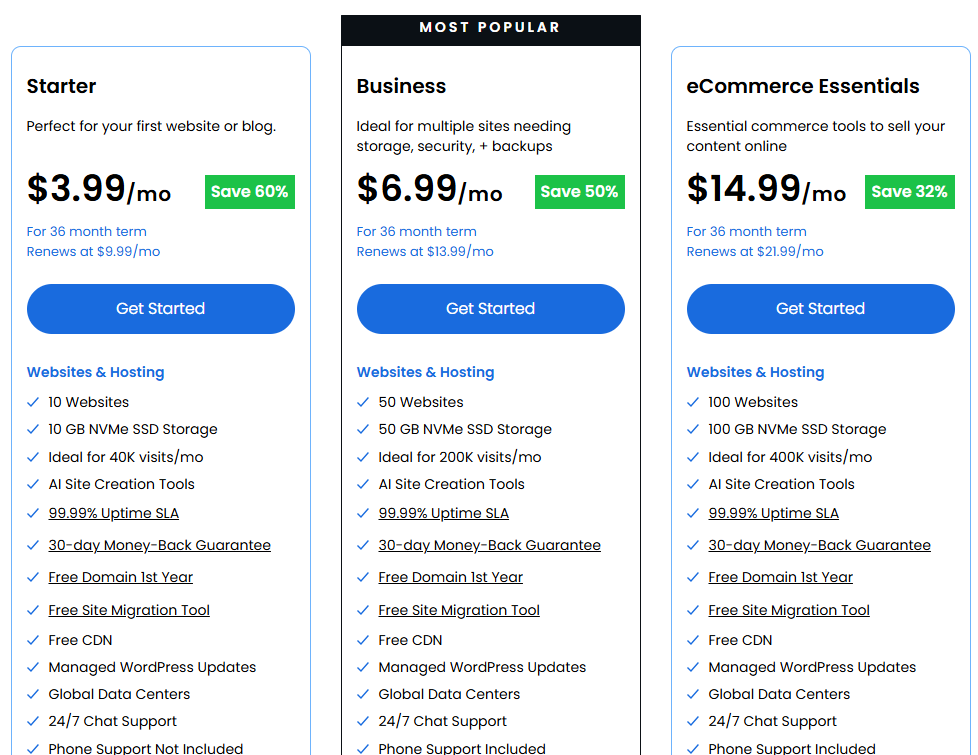
Starter — $3.99/mo
The entry-level plan works fine for a single blog or personal site. You get 10 websites, 10 GB NVMe SSD storage, and traffic capacity up to 40K visits/month. Free domain, SSL, and CDN are included.
What’s missing here: no phone support, and the storage is tight if you plan to run a media-heavy site. Fine for bloggers and content sites. Not great for WooCommerce.
Business — $6.99/mo (Most Popular)
This is where Bluehost’s managed setup actually starts to make sense. You get 50 websites, 50 GB NVMe SSD storage, up to 200K visits/month, phone support, malware detection/removal (not just scanning), and domain privacy for free in the first year.
It also includes a WordPress staging site — which matters if you’re updating themes or plugins on a live client site. From what I’ve observed working on client projects, having a staging environment directly inside your hosting panel saves a lot of back-and-forth. No need for a third-party plugin just to test before pushing changes live.
eCommerce Essentials — $14.99/mo
Built for WooCommerce-focused sites. Adds 100 websites, 100 GB storage, visitor memberships, affiliate program features, easy social logins, and WooCommerce auto-install. Secure payment processing is included out of the box.
If you’re launching an online store and want everything in one place — payments, subscriptions, membership management — this plan makes that doable without stacking plugins.
What Makes Bluehost’s Managed WordPress Different
A few things stand out compared to generic shared hosting dressed up as “WordPress hosting”:
NVMe SSD storage with object caching. Bluehost uses NVMe drives across all plans, which is noticeably faster for database-heavy WordPress sites compared to standard SSDs. Object caching is included — this directly improves TTFB (Time to First Byte), which feeds into your Core Web Vitals score.
AI website builder baked in. You describe your business, and Bluehost generates the full site — pages, navigation, images, and SEO metadata. No template wrestling. This isn’t a gimmick; it’s genuinely useful for clients who want something live fast.
Automatic WordPress updates managed for you. Core, themes, and plugins are updated and security-tested before being applied. If something breaks, you’re covered — they handle rollbacks. This is the kind of thing that separates managed hosting from cheap shared plans where you’re on your own.
Built-in Yoast SEO (free plugin pre-installed). Not a huge deal if you were already going to install it, but having it pre-configured on a fresh WordPress install saves 10–15 minutes per site.
0.35s average US load time. Bluehost cites independent testing from WPShout showing 0.35s load time — faster than Kinsta (0.43s), WP Engine (0.53s), SiteGround (1.17s), and Hostinger (1.92s). The 98/100 performance score and 0.65s First Contentful Paint are solid numbers, though your actual speed will depend on your site’s setup, images, and plugins.
From a developer perspective, the server stack here (PHP 8, HTTP/3, object caching, static content caching) is well-configured for WordPress out of the box. You’re not starting from scratch with optimization.
What Bluehost Gets Right — And Where It Falls Short
Pros
- WordPress.org official recommendation since 2005 — not a marketing claim, there’s a real vetting process behind it
- Managed WordPress updates mean you’re not chasing security patches manually
- Staging site on Business and above — essential for agency/client work
- AI site builder significantly reduces launch time for new projects
- 24/7 support from WordPress-trained humans (not bots) with under 2-minute average response
- Free migration tool with zero downtime — handles up to 5 sites in the first 30 days
Cons
- Starter plan’s 10 GB storage fills up fast if you’re uploading videos or high-res images
- Phone support is not included on the Starter plan — only chat
- Renewal pricing jumps significantly. Starter goes from $3.99/mo to $9.99/mo after the initial term — worth planning for
- No monthly billing option with this level of discount. The 60% deal requires a 3-year commitment upfront
- eCommerce tools like product subscriptions and visitor memberships only appear on the $14.99/mo plan — that’s a big jump from Business
How Bluehost Compares to the Alternatives
Before pulling the trigger on any hosting deal, it helps to see how the numbers actually stack up.
| Feature | Bluehost Business | Hostinger Business+AI | Liquid Web Spark–Thrive | Thamara Grow |
|---|---|---|---|---|
| Intro Price | $6.99/mo | $3.99/mo | $10/mo | $3.99/mo |
| Renewal Price | $13.99/mo | $16.99/mo | $10/mo (stable) | $14.49/mo |
| Storage | 50 GB NVMe | 50 GB NVMe | 15 GB SSD | 50 GB NVMe |
| Sites Allowed | 50 | 50 | 1 | 50 |
| Staging Site | Yes | Yes | Yes | Not specified |
| Free Domain | Yes (1 yr) | Yes (1 yr) | No | Yes (1 yr) |
| WP Recommendation | Official | Official | No | No |
| AI Tools | Builder + SEO | Builder + Kodee Agent | Kadence AI | AI Engine |
| Free Migration | Up to 5 sites | Unlimited | Assisted | Yes |
| Support | 24/7 Chat + Phone | 24/7 Chat | 24/7 Expert | 24/7 Chat |
| Best For | Managed + beginners | Budget + AI-first | Performance + scale | SEO-focused bloggers |
→ Get Hostinger Deal | Liquid Web | Thamara
Reading that table honestly:
For most WordPress beginners and bloggers, Hostinger’s Business+AI at $3.99/mo is the most budget-friendly alternative — and it includes an AI agent (Kodee) that can manage your site via chat. That’s genuinely useful for non-technical users. The trade-off: Hostinger’s renewal at $16.99/mo is actually higher than Bluehost’s $13.99/mo, so Bluehost is cheaper long-term.
Liquid Web’s Spark–Thrive is a completely different category. At $10/mo with a stable renewal rate (no renewal shock), it’s aimed at developers and agencies managing high-traffic or performance-critical sites. It’s not a deal play — it’s a serious infrastructure choice.
Thamara is interesting for SEO-focused blogs because of the bundled plugin stack (Perfmatters, ShortPixel, Rank Math). If those are plugins you’d pay for anyway, Thamara’s pricing suddenly looks very competitive. Less brand recognition, though, and renewal pricing is steep.
For a first WordPress site or migrating from a slow host, Bluehost at $3.99/mo or $6.99/mo is the right call. The WordPress.org backing, managed updates, and phone support on Business make it a more comfortable choice for someone not wanting to manage technical details.
Is This the Lowest Bluehost Price Available?
The current 60% off promo on Starter ($3.99/mo) is Bluehost’s deepest published discount for their WordPress hosting. Historically, their biggest deals appear around Black Friday and major seasonal promotions — but this current deal is comparable to what they offered in those windows.
There’s no additional promo code that stacks on top of this. The discount is applied automatically through the affiliate link. What you see at checkout is what you pay.
If you’re deciding between signing up now versus waiting — the price is unlikely to drop further outside of a Black Friday window. And even then, the difference is usually within cents per month.
What to Do After Buying
A few things worth setting up immediately after your Bluehost account goes live:
- Connect your domain early. If you registered your domain elsewhere, update the nameservers first. DNS propagation takes up to 24 hours — do it before you build anything.
- Enable the CDN. Bluehost includes a global CDN — it’s not on by default on all plans. Switch it on from your hosting panel immediately. It helps with LCP scores, especially for international visitors.
- Set up staging before your first plugin install. Go to your WordPress panel and create a staging clone before you start installing themes or plugins. If something breaks during setup, you’ll thank yourself.
- Run PageSpeed Insights once the site is live. Note your baseline scores. Then enable object caching and static content caching from the Bluehost panel and re-check. You’ll usually see a 10–20 point improvement.
- Don’t install Yoast manually — it’s already pre-installed. Just go to SEO settings and configure your site name, social profiles, and sitemap.
Price Disclaimer: The price of this product may change over time due to discounts, promotions, or other factors. It may increase or decrease, so we recommend checking the official website for the most accurate and updated price. The link is provided in the article.
Exclusive Bluehost WordPress Hosting Discount
Deal: Up to 60% OFF
Coupon Code: No code needed – Discounted Link
Common Questions About Bluehost WordPress Hosting Deals
Does the Bluehost WordPress deal require a promo code?
No promo code is needed. The discount is applied automatically when you click through the deal link. You’ll see the discounted price reflected at checkout before entering payment details.
What happens to my price when the term ends?
Bluehost’s introductory pricing applies only to the initial term. After 3 years, Starter renews at $9.99/mo, Business at $13.99/mo, and eCommerce at $21.99/mo. This is standard practice with most hosting providers, not unique to Bluehost. Factor this in before committing.
Is Bluehost actually recommended by WordPress.org?
Yes — Bluehost has been an official WordPress.org recommended host since 2005. WordPress.org vets hosts based on speed, security, and customer support standards. It’s a real endorsement, not a paid badge.
Can I host multiple websites on one Bluehost plan?
Yes. The Starter plan supports up to 10 websites, the Business plan supports 50, and the eCommerce plan supports 100. If you’re managing client sites or running multiple niche blogs, the Business plan is the most cost-effective entry point for multi-site use.
Does Bluehost include a free SSL certificate?
All plans include a free SSL via Let’s Encrypt. It’s applied automatically to your domain — you don’t need to install it separately or configure anything.
What is the refund policy?
Bluehost offers a 30-day money-back guarantee for hosting plans paid by credit card. Domain registration fees and setup fees are non-refundable. The guarantee applies to the hosting portion of your purchase only.
Final Verdict
Bluehost’s current WordPress hosting deal — up to 60% off — is one of the more solid options available right now for anyone starting or moving a WordPress site. The Starter plan at $3.99/mo is a low-risk entry point, and the Business plan at $6.99/mo is where the real value is: staging site, phone support, malware removal, and 50 websites for less than a cup of coffee per day.
Renewal pricing is the one thing to plan around — it’s not the cheapest at renewal. But the managed experience, WordPress.org backing, and developer-ready stack make it worth paying a bit more at renewal compared to the headaches of cheaper unmanaged hosts.
→ Get Bluehost WordPress Hosting — Up to 60% Off
Start building your brand, choose your plan
Begin your journey to success by building your brand—explore and choose the perfect plan that fits your needs today!
Basic
Websites & Hosting
- 10 Websites
- 10 GB NVMe SSD Storage
- Ideal for 40K visits/mo
- AI Site Creation Tools
- 99.99% Uptime SLA
- 30-day Money-Back Guarantee
- Free Domain 1st Year
- Free Site Migration Tool
- Free CDN
- Managed WordPress Updates
- Global Data Centers
- 24/7 Chat Support
- Phone Support Not Included
Choice Plus
Websites & Hosting
- 50 Websites
- 50 GB NVMe SSD Storage
- Ideal for 200K visits/mo
- AI Site Creation Tools
- 99.99% Uptime SLA
- 30-day Money-Back Guarantee
- Free Domain 1st Year
- Free Site Migration Tool
- Free CDN
- Managed WordPress Updates
- Global Data Centers
- 24/7 Chat Support
- Phone Support Included
eCommerce Essentials
Websites & Hosting
- 100 Websites
- 100 GB NVMe SSD Storage
- Ideal for 400K visits/mo
- AI Site Creation Tools
- 99.99% Uptime SLA
- 30-day Money-Back Guarantee
- Free Domain 1st Year
- Free Site Migration Tool
- Free CDN
- Managed WordPress Updates
- Global Data Centers
- 24/7 Chat Support
- Phone Support Included
