BigRock’s Black Friday sale is live right now, and the headline number is up to 80% off. That figure applies to Shared Hosting, which also gets an extra 5% on top. VPS, WordPress, Business and Windows hosting are discounted too, just at lower percentages.
No coupon code to hunt for. The discount is auto-applied, so you pick a plan and the reduced price shows up at checkout. BigRock hasn’t announced an end date yet, which means this could close without much warning. It also helps if you’re comparing hosts and wondering whether a “cheap” plan is actually usable.
This page is for people running small to mid-sized sites in India who want cheap NVMe hosting without paying for resources they won’t use. Think first-time bloggers, local business sites, and freelancers hosting client projects. I’m Karan Rajput, and after 7+ years of blogging and client WordPress work, I’ve seen how often people overbuy during sales.
Below you’ll find the exact discount per plan, how to claim it, what BigRock’s speed claims mean in practice, and who should skip this deal. Everything here is built from what BigRock lists on its own Black Friday page as of 25 November 2026. Prices and offer details can change, so check the official page before paying.
BigRock Black Friday Deal Snapshot [STATUS: LIVE NOW]
Starts on: Live now | Ends on: Not announced by BigRock yet

This post contains affiliate links. If you purchase through our links, we may earn a small commission at no extra cost to you. Thank you for your support!

Quick Answer: BigRock’s best value this Black Friday is Shared Hosting: up to 80% off plus an extra 5%, auto-applied at checkout. It covers one website, so it fits a single blog or small business site. Need more headroom? Look at Business or VPS. No end date has been announced.
How to Claim the Offer (No Coupon Needed)
It takes a couple of minutes. Here’s the order I’d follow:
- Open the sale page. Go to BigRock’s Black Friday page through this link so the offer pricing loads properly.
- Choose your plan by specs, not just price. The banner shows VPS from ₹259/mo, but the plan comparison block lower on the page lists a VPS plan at ₹329/mo (1 Core, 2 GB RAM, 50 GB storage). These look like different configurations, so match the specs to your needs.
- Skip the coupon hunt. The discount is auto-applied. Check that the cart total reflects it, and the extra 5% if you picked Shared. If the total looks off, ask BigRock support before paying.
- Add a domain if you need one. The new .SI extension is listed from ₹1,169/yr.
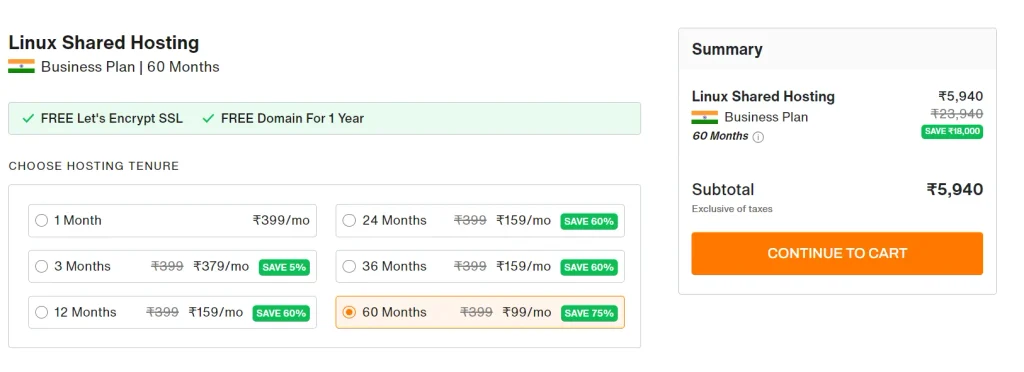
- Read the order summary. Check the billing term and renewal price before you pay. Intro discounts on hosting commonly apply to the first term only.
Which BigRock Plan Actually Fits Your Site?
Here’s how I’d read the lineup:
- Shared Hosting (up to 80% + extra 5%): BigRock pitches it for personal use. You get 1 website, 20 GB NVMe SSD storage, 200 GB transfer, 10 email accounts, unlimited databases, free Let’s Encrypt SSL, and a free website design consultation. For a text-heavy blog that’s plenty. On client sites, storage usually gets eaten by product images and backup copies, not WordPress core files.
- WordPress Hosting (up to 55%): Built on NVMe SSDs and AMD EPYC processors, with free SSL and 24/7 local expert support. It makes sense if you only run WordPress and want support that knows the platform.
- Business Hosting (up to 70%): NVMe SSD storage, free SSL and unlimited bandwidth. A step up when a single small site is no longer the whole plan.
- VPS Hosting (up to 75%): Full root access, NVMe storage, and a free 10 GB Acronis backup. The plan block lists 1 Core, 2 GB RAM, 50 GB storage and 1 TB bandwidth. Root access means server management is on you.
- Windows Hosting (up to 50%): Meant for Windows-based stacks, with no limits on transfers and databases. Skip it for a normal WordPress site.
- Dedicated Servers: 4 vCPU cores, 32 GB RAM, 500 GB NVMe SSD. Managed services are available at additional cost.
Do BigRock’s Speed Claims Hold Up for WordPress?
BigRock’s page shows a 0.91s fully loaded time, a 0.82s Largest Contentful Paint, and “5x faster server response” against other Indian hosts. It cites GTmetrix comparison data from June 2026. For reference, Google treats an LCP under 2.5 seconds as good.
Those are BigRock’s numbers from its own test setup, not mine. From a performance standpoint, I treat host benchmarks as a ceiling, not a promise. A faster server mostly improves TTFB. It won’t fix a page builder loading five JS libraries or an uncompressed hero image.
BigRock doesn’t spell out anything specific for Elementor, Gutenberg or WooCommerce. If you’re moving a live store, do a test import on staging first, then check LCP and CLS in PageSpeed Insights before switching DNS. Also note that free migration is listed for the VPS and Dedicated plans, not for Shared.
Where This Deal Falls Short
A few things I’d want to know before paying:
- No announced end date. That sounds relaxed, but it means the offer can vanish without notice.
- One website on Shared. Anyone running several micro-niche sites will hit this wall fast.
- VPS server location. The VPS plan block lists a USA server. If your readers are mostly in India, expect extra latency. A CDN helps, but it’s one more thing to set up.
- Backup fine print. “Daily Backups*” on Shared carries an asterisk, and the terms aren’t spelled out on the page.
- Renewal pricing isn’t shown. Check it in the order summary.
Pro observation: Whatever backup a host gives you, keep your own offsite copy. Restoring from your own backup is almost always faster and gives you more control.
Who should skip this: Agencies hosting many client sites on the cheapest tier, anyone uncomfortable managing a root-access VPS, and anyone who wants confirmed renewal pricing before committing.
| Shared Hosting | VPS Hosting | Dedicated Server | |
|---|---|---|---|
| Black Friday discount | Up to 80% + extra 5% | Up to 75% | Check BigRock’s page |
| CPU / RAM | Not listed | 1 Core / 2 GB | 4 vCPU Cores / 32 GB |
| Storage | 20 GB NVMe SSD | 50 GB | 500 GB NVMe SSD |
| Bandwidth | 200 GB transfer | 1 TB | Unmetered |
| Control level | 1 website | Full root access | Full root access, cPanel and WHMCS supported |
| Free extras | Let’s Encrypt SSL, website design consultation | 10 GB Acronis backup, 1 dedicated IP, website migration | Website migration, 2 dedicated IPs |
| Best for | Personal sites | High-traffic websites | Resource-heavy sites and apps |
Shared is the budget pick but caps you at one site. VPS gives real resources and root control, but you take on the server work. Dedicated is for projects that have clearly outgrown both.
For a single blog or small business site, Shared Hosting is better because 20 GB NVMe storage and 200 GB transfer cover it, and it carries the biggest discount. If you’re outgrowing shared limits, VPS makes more sense with its 2 GB RAM and root access. For heavy apps, go Dedicated. Shared’s one-website cap is its clearest weakness.
Want to compare other hosts’ offers? I keep them together on the Black Friday deals page.
Is the New .SI Domain Worth Grabbing?
.SI is Slovenia’s country-code domain, and BigRock is pitching it as a “Superintelligence” domain for AI and tech projects. For an AI side project, portfolio, or experiment, it’s a memorable pick.
For a business targeting Indian customers, I’d still lean toward .in or .com. Country-code domains are generally treated as country-specific by search engines. Check the renewal price before registering.
What to Do After Buying
Don’t rush into installing everything. A clean setup now saves headaches later:
- Set up SSL and force HTTPS across the whole site.
- Install WordPress with only essential plugins. Every extra plugin adds JS and CSS.
- Enable caching and lazy loading for images below the fold.
- Run PageSpeed Insights and note your baseline LCP and CLS.
- Set up an offsite backup that doesn’t depend on the host.
- Create your email accounts and note your renewal date.
Mistakes to avoid: stacking page-builder add-ons you don’t use, skipping the backup setup, and ignoring the renewal date.
BigRock Black Friday Deal
Deal: Up to 80% Off + Extra 5%
Coupon Code: No code needed – Discounted Link
Frequently Asked Questions
Is there a BigRock Black Friday coupon code?
No code is needed. The discount is auto-applied, so the reduced price should show once you pick a plan. If your cart total doesn’t match what the page advertises, contact BigRock support before completing the payment.
When does the BigRock Black Friday sale end?
BigRock hasn’t announced an end date yet. Sales like this can close without much notice, so if you’ve already picked a plan, I wouldn’t wait. Always check the official page for the latest status before paying.
Which plan is best for a beginner?
If you have one website, Shared Hosting is the simplest start and carries the biggest discount. If you only run WordPress and want support that knows the platform, the WordPress Hosting plan is worth a look. VPS suits people comfortable managing a server.
Does the extra 5% apply to every plan?
Based on the offer details I have, the extra 5% is listed with Shared Hosting only. The other plans show “up to” percentages. Check the order summary to confirm what applies to your cart.
Can I get free website migration?
BigRock’s plan block lists free website migration for VPS and Dedicated. It isn’t listed for Shared. If you’re moving an existing site to Shared, confirm migration help with BigRock support first.
Bottom Line
BigRock’s Black Friday offer is worth a look if you want affordable NVMe hosting in India. Shared Hosting is the strongest value at up to 80% off plus an extra 5%, as long as one website is enough. Step up to Business or VPS if you need more room, and read the order summary for term and renewal pricing before paying. If it fits, you can claim the BigRock offer here while it’s still live.
