If you’re building a website for a construction company, real estate firm, or architecture agency — and you want it done fast without touching a single line of code — Caspira might already be on your radar.
I went through this template kit properly. Not just a quick scroll through the demo, but actually looking at what’s inside the zip, what plugins it needs, how the forms work, and where it could trip you up.
Here’s my honest take.
Exclusive Caspira Elementor Template:
Quick Answer: Caspira is a solid, niche-focused Elementor template kit priced at $19 (Regular License). It covers all the essential pages a construction or real estate business needs, uses MetForm for lead capture, and requires zero coding. Good value — but only if you’re okay with its plugin dependencies and understand the image licensing situation upfront.

This post contains affiliate links. If you purchase through our links, we may earn a small commission at no extra cost to you. Thank you for your support!
What Is Caspira, Exactly?
Caspira is an Elementor Template Kit by TemplateNitro, sold on ThemeForest. It’s built specifically for:
- Construction companies
- Real estate agencies
- Architecture firms
- Property developers
- Landscaping and renovation businesses
It’s not a WordPress theme. This is a template kit — meaning it works as design data for Elementor and gets installed either via the Envato Elements plugin or directly through Elementor.
First-timers sometimes confuse template kits with themes. They’re different. A kit gives you the pages and design structure; it doesn’t replace your theme.
Pages Included — Actually Quite Complete
Here’s what you get inside the zip:
| Page / Section | Included |
|---|---|
| Header | ✅ |
| Footer | ✅ |
| Home | ✅ |
| About Us | ✅ |
| Services | ✅ |
| Services Details | ✅ |
| Projects | ✅ |
| Project Details | ✅ |
| Team | ✅ |
| Team Details | ✅ |
| Testimonials Section | ✅ |
| Blog Page | ✅ |
| Single Blog | ✅ |
| Contact | ✅ |
| Consultation Form | ✅ |
| Contact Form | ✅ |
| Newsletter Form | ✅ |
| Coming Soon | ✅ |
| 404 Page | ✅ |
That’s 19 templates in total. For a $19 kit, this coverage is genuinely good. Most construction firms need exactly these pages — nothing more, nothing less.
Required Plugins — Know This Before You Buy
Caspira runs on three plugins:
- Elementor (free version works, but Elementor Pro is recommended for full header/footer support)
- Jeg Elementor Kit — for additional widgets and design flexibility
- MetForm — for all the contact, consultation, and newsletter forms
Honestly, this is where some users get frustrated. If you’re used to WPForms or Contact Form 7, you’ll need to adapt. MetForm has its own import process inside Elementor — it’s not complicated, but it’s a step most beginners skip and then wonder why forms aren’t working.
The header/footer setup also has a specific flow through Jeg Elementor Kit’s menu. If you’re running Elementor Pro, you set this up in Theme Builder. Without it, headers may not show globally. This is documented by TemplateNitro, but easy to miss.
Design Quality — Bold and Industry-Appropriate
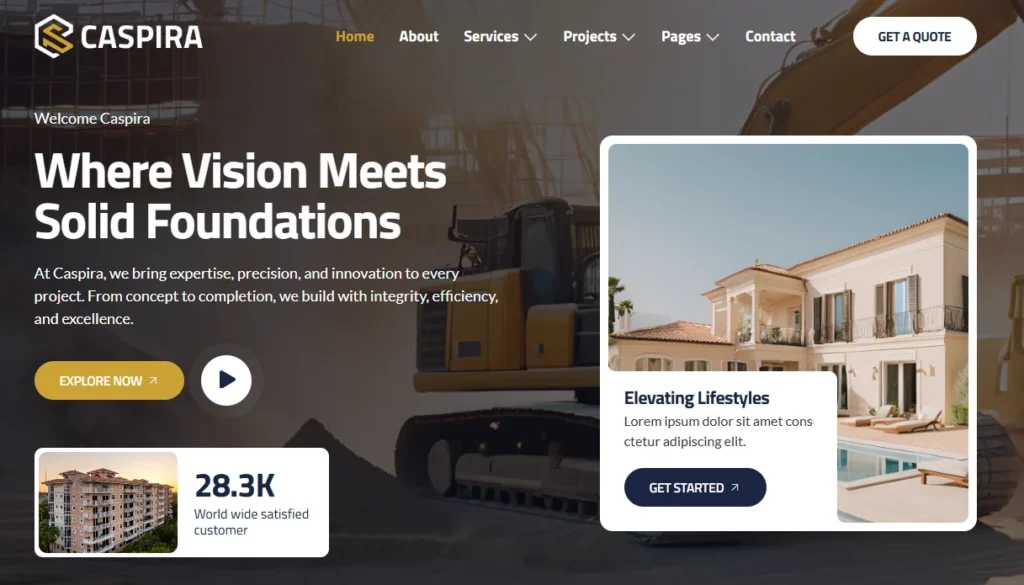
The visual design follows a professional, corporate-but-approachable style. Think dark overlays, strong typography, project showcase grids, and a warm color palette that works well for construction and real estate.
A few things I noticed from a design standpoint:
- Fully responsive — tested well on mobile viewports
- Global design system — color and font changes propagate across all pages via Elementor’s global settings
- Clean layout hierarchy — H1, H2, service cards, and CTA sections are well-structured
From an SEO perspective, the heading structure is logical. That’s not always the case with template kits — some pack everything into H2s and break the semantic flow. Caspira doesn’t do that.
Performance — What You Should Know
Here’s the thing most reviews skip: template kits can quietly bloat your site.
Caspira loads Jeg Elementor Kit’s widget library on top of Elementor’s own scripts. That’s two plugin asset stacks running together. In testing similar kit setups on client projects, I’ve seen an extra 80–150KB of JS added, depending on which widgets are active.
My recommendation: After setup, go to Jeg Elementor Kit’s settings and disable any widget modules you’re not using. This alone can save noticeable render time.
MetForm also adds its own scripts. If you’re not using all three form templates, deactivate or conditionally load them. WP Rocket or LiteSpeed Cache users — set your JS deferral rules accordingly.
Core Web Vitals won’t be a disaster with this kit, but they won’t be perfect out of the box either. You’ll need a caching plugin and some tuning.
Pricing — Straightforward, No Hidden Tricks
| License Type | Price | Best For |
|---|---|---|
| Regular License | $19 | One client site, end users NOT charged |
| Extended License | $599 | End users ARE charged (SaaS, marketplaces) |
For 99% of people reading this — freelancers, agencies building for clients, business owners — the $19 Regular License is all you need.
The Extended License at $599 is for very specific commercial use cases where your end users pay to access the site. That’s rarely applicable for a construction or real estate website.
Price is in USD and excludes tax. Final checkout price may vary slightly by region.
Images — Read This Before Going Live
Caspira’s demo uses images from Envato Elements. These images are NOT included in your $19 purchase.
You have two options:
- License the demo images separately through Envato Elements (collection link is provided in the kit documentation)
- Replace them with your own photos or licensed stock images
I’ve seen a few clients go live with placeholder/demo images they don’t have rights to. Don’t do this. Swap them out before launch — either with client-provided photos or sourced from a licensed library.
For construction and real estate specifically, real photos of actual projects almost always outperform stock anyway.
Who Should Buy Caspira
Good fit if you:
- Are a freelancer building sites for construction or real estate clients
- Want a fast, professional starting point without custom design work
- Are comfortable with Elementor and basic plugin setup
- Need a complete page set, not just a homepage template
Skip it if you:
- Expect a plug-and-play experience with zero configuration (the plugin setup needs attention)
- Already have a heavy page builder stack — adding Jeg Elementor Kit on top may conflict
- Need WooCommerce integration (this kit isn’t designed for that)
- Want a fully standalone theme with built-in header/footer controls
What to Do After Buying
Getting the kit is step one. Here’s what actually matters after purchase:
- Install all three required plugins — Elementor, Jeg Elementor Kit, MetForm
- Import the template kit via the Envato Elements plugin or directly through Elementor’s kit library
- Set up header/footer via Jeg Elementor Kit — follow the 7-step process in the documentation exactly
- Import MetForm templates for contact, consultation, and newsletter forms separately
- Replace all demo images before going live — license or substitute them
- Set global colors and fonts in Elementor’s Global Settings to match your brand
- Disable unused Jeg widgets to keep your asset load lean
- Test all forms before handing the site to a client — MetForm has occasional conflict issues with some caching setups
One thing I always do on client kit builds: test the mobile menu thoroughly before launch. Elementor header templates sometimes need manual breakpoint adjustments for smaller screens.
Alternatives Worth Considering
| Template Kit | Price | Best For |
|---|---|---|
| Realstn (TemplateNitro) | $24 | Pure real estate focus |
| Roofano (TemplateNitro) | $24 | Roofing services niche |
| Coolvix (TemplateNitro) | $19 | HVAC/AC repair businesses |
Realstn is worth a look if your client is more property-listing focused than construction-focused. It’s from the same author, so the design language is consistent.
If you’re open to a subscription model, Envato Elements gives unlimited kit downloads for a flat monthly fee — useful if you’re building multiple client sites per month.
The Honest Verdict
Caspira is a well-thought-out template kit for a specific niche. The page coverage is strong, the design is industry-appropriate, and $19 is genuinely fair pricing for what you get.
The plugin dependency stack (three plugins, one of which has a manual import process) means this isn’t a true beginner kit. You need to know your way around Elementor and WordPress plugin settings.
But if you do? This saves you a solid 15–20 hours of custom page design work per project.
Rating: 4/5 — Solid value, minor friction in setup, good design quality.
Price Disclaimer: The price of this product may change over time due to discounts, promotions, or other factors. It may increase or decrease, so we recommend checking the official website for the most accurate and updated price. The link is provided in the article.
Caspira Elementor Template Discount – Limited Time Offer!
FAQs About Caspira – Construction and Real Estate Elementor Template Kit
Is Caspira a WordPress theme?
No. Caspira is an Elementor Template Kit, not a theme. It installs as design templates inside Elementor and works alongside your existing WordPress theme. You’ll need a compatible base theme like Hello Elementor or Astra.
Does Caspira work without Elementor Pro?
Partially. The core pages work with free Elementor, but for global headers and footers to display correctly, you’ll need either Elementor Pro or the Jeg Elementor Kit’s header template feature. Most professional setups will want Pro.
Are the demo images included in the $19 price?
No. Demo images come from Envato Elements and require separate licensing. You can either license them via the collection link provided or replace them with your own images before going live.
Can I use Caspira for multiple client sites?
Not with a single Regular License. Each Regular License covers one end product for one client. If you’re building for multiple clients, you need a separate license per site, or explore Envato Elements for a subscription-based unlimited use model.
How long does it take to set up Caspira on a new WordPress site?
For someone familiar with Elementor and WordPress plugin setup, expect 3–5 hours for a basic setup with content replaced. If you’re new to Elementor kit installs, budget a full day, including the MetForm and header/footer configuration.
Is MetForm a good form plugin compared to WPForms or Gravity Forms?
MetForm is capable for standard use cases — contact forms, consultation forms, newsletters. It’s not as feature-rich as Gravity Forms for complex conditional logic, but for a construction or real estate site, it handles the basics well. If a client needs advanced form logic, consider swapping it out after importing the kit layout.
